
ChoiceFlow Game Wiki
Explore the game’s stats, unlocks, costs and rules, with worked examples and real game screens.
Updated · What’s New
No topics found
Try a different word, such as school, tennis or banking.
Getting started
Where to find it: Character selection → Create New Character. During play: Settings → Characters.
Before you start: Starting ages depend on account progress. Creating an additional life requires a free living-character slot.
Character creation rules
Scroll across to read the full table.
| Stat or rule | Value | What it means |
|---|---|---|
| First unlocked starting age | 0 | A fresh account starts with a baby. Older starting ages unlock through account progress. |
| Older starting age | At most the highest age reached on the account | Character creation enforces this limit, including characters made with Random. |
| Free living-character limit | 3 | You can create another life only while below the limit. |
| Verified Plus living-character limit | 6 | The larger limit requires verified membership on the current account. |
| Dead characters in the living limit | 0 slots | The creation guard counts living lives; a death does not permanently consume a living slot. |
| After Plus ends | Existing lives stay playable | The current cap controls creating another life, not opening existing lives. |
| Base creation skill cap | Level 30 before Karma bonuses | Starting skill values have this cap. An applied Karma bonus can raise them above it, and later training can take them further. |
| Personality choices | 6 | Ambitious, Charming, Intellectual, Creative, Disciplined and Adventurous have different skill and relationship modifiers. |
Your starting life
Your first life starts as a baby. Play to unlock older starting ages for future characters; you can only start at an age your account has already reached. Choose a name, appearance, personality and starting location, then read your family's starting story.
Lives and account limits
Free accounts can have three living characters at once. Verified ChoiceFlow Plus members can have six. Characters who have died do not count toward this limit. If Plus ends, you can keep playing your existing characters. Your current limit determines whether you can start another life.
Before you begin
- Check your health, happiness, energy and money before choosing an activity.
- Read the requirements on a locked action to see what your character needs.
- Use Settings to adjust the game and return to character selection when you want to switch lives.
Finding your way
Home contains the school and lifestyle options available at your age. Depending on your button settings, Relationships, Assets, Activities and Shopping can appear on Home or the bottom bar. The relationship shortcut in the bottom navigation bar is called Bonds. Change shortcuts in Settings, Preferences, then Button Layout. Martial Arts and Tennis can also move from Extra to the bottom bar. Moving a shortcut does not remove the feature. Extra on Home contains other options such as martial arts, tennis, pets, travel and vehicle licences.
Check your creation choices
Use Random if you want a ready-made starting character, then review the result before continuing. Random still respects your unlocked starting ages. Open the personality explanation to compare its skill and relationship effects. A personality can help particular skills grow, but it does not grant a qualification or career.
Choose your city and read the starting situation. Changing the starting age can regenerate that situation, so review the family story after making your final choices.
Early pocket money
At ages 7 to 17, open a living parent’s relationship card and look for Ask for Allowance. Accept the proposed challenge before doing its named tasks. The option depends on your current allowance and home situation; asking does not immediately award the money.
Starting level and maximum level are different
The level-30 creation cap applies to ordinary starting skills, not later training. A new life can progress beyond it. Review selected Karma bonuses separately. Select owned starting stat, cash and learning bonuses during creation to apply them; creation unlocks such as Family Architect work through ownership.
Related: Your first year, Relationships and dating, Character stats and achievements.
Your first year
Where to find it: Home → New Year. Login rewards: Home → Extra → Communities → streak banner, when shown.
Before you start: New Year needs an active living character and any required decisions completed. Login streaks use real local calendar days.
Time and annual refresh rules
Scroll across to read the full table.
| Stat or rule | Value | What it means |
|---|---|---|
| New Year age change | +1 character year | One successful advance processes a year of this life. Required choices can stop the advance. |
| Activity duration labels | No character-age advance | A label such as one hour describes the activity; it does not replace the New Year button. |
| Energy at the start of a new year | Reset to current energy capacity | Capacity normally starts at 100 but medical effects can change it. Later yearly effects can reduce what remains. |
| Required event or interview | Must be finished first | Resolve the named open choice before trying New Year again. |
| Unfinished live sports match | Must be finished first | Resume it or simulate the rest rather than starting another year. |
| Login-streak day | Real local calendar day | Returning again on the same date does not add another streak day. Character years and login days are separate. |
| Streak protection | At most 3 saved days held | Each saved day automatically covers one missed login day, if the held saves cover the gap. It preserves the streak, not extra days of progress. |
| Streak-save milestones | 7, 30, 90, 180 and 365 streak days, then every 90 | These award protection up to the held cap. Read the roadmap for gifts, which have their own claim state. |
Your first steps
- Read your starting story and meet the family members available to your character.
- Try an activity available at your age. Its card explains the energy cost and what you can gain.
- Leave energy for school, work, training or other commitments once they become available.
- Read any event and make your choice before moving on.
- Tap New Year when you are ready to advance your character's age and process the year's changes. Energy is restored, but annual health effects can leave it below your maximum.
When time moves
Your choices happen within the current year. New Year advances your character's age. Activity duration labels do not advance your age, and leaving the app open does not age your character in real time.
When New Year is blocked
Read the reason beside New Year and finish the action it names. An unfinished interview or event, a school choice, a required final exam or a completed degree waiting for graduation can stop the year advancing. Open the relevant screen to resolve it rather than repeating unrelated activities.
An interrupted sports match must also be resumed or simulated to completion. Once the year finishes, review the new age, school or work notices and annual payments before choosing more activities.
Login days are a separate clock
The Communities streak banner opens your milestone roadmap and saved gifts. Its login days are real days, while New Year advances character age. Advancing several character years does not create extra login days. Read a gift’s rewards and choose the skill for its XP when asked.
The Communities banner and roadmap show your Personal best. You can collect the gift for reaching 365 days once per account. It includes 50,000,000, 1,000 Karma, up to 100 Energy, 100 spare naps and 500,000 base XP for a skill you choose.
A protected gap is not extra progress
If the gap between logins is fully covered by saved days, the streak increases by one when you return. It does not add every missed day to the streak. Without enough protection, the current streak starts again at one.
Related: Education, Life events and your story, Activities.
Character stats and achievements
Where to find it: Stats. Account progress: Settings → Achievements. Bonuses: character creation → Karma Store. Boards: Home → Extra → Communities.
Before you start: Account achievements and Karma purchases need a signed-in account. Live leaderboards need a connection; appearing on them also requires a Game Username.
Readings that are not interchangeable
Scroll across to read the full table.
| Stat or rule | Value | What it means |
|---|---|---|
| Health | 0–100 | A bounded health stat, separate from earned skill levels. Conditions and injuries can have effects beyond this single number. |
| Energy | 0 to the current capacity; base capacity 100 | Actions spend energy. Medical capacity modifiers and equipment in use can change the ceiling. |
| Happiness | 0–100 | The visible wellbeing percentage. Ordinary happiness gains and losses change this score, not a displayed trainable Happiness level. |
| Mood score | 0–100 | Calculated from current life circumstances. It is a target influencing Happiness, not a replacement for the current Happiness value. |
| Yearly mood-convergence term | Capped at ±5 before rounding | This term is calculated separately from other yearly Happiness changes. Read Mood Analysis for the current projection; it is not a cap on the total change from every source. |
| Karma | Account points, separate from money | Rewards and purchases affect the account balance. It is not a wallet or bank balance. |
| Account achievements | Unlocked once for that account | Requirements and current progress vary by achievement. A different character can contribute account progress without making every achievement repeatable. |
| Displayed skill modifier | Separate from the trained level | A loadout item contribution is capped at +15 per skill; equipped clothing, belts and medical effects are calculated separately. |
Your character
Open Stats to review your character's personality, interests, qualifications, reputation, combat progress and health.
Achievements
Settings, then Achievements, shows account achievements when you are signed in.
Karma Store
During character creation, open the Karma Store to see available bonuses, their costs and effects. Choose which owned bonuses to apply before starting your life.
Understand mood and progress
Open Mood Analysis in Stats to see the circumstances helping or hurting your character. Mood and Happiness are different: Happiness moves toward the mood score during yearly processing. Improving a listed problem can help future wellbeing without instantly replacing your current Happiness.
Achievements and standings
Expand an achievement category and then an achievement to read its requirement and available progress. These are account records across lives. Communities also has Minigame and Wealth Leaderboards. Set your public Game Username in Settings, Profile, Account before competing; the username is separate from your character’s name.
Buy once, choose for each life
Karma is an account balance, not wallet money. A successful Karma Store purchase permanently unlocks that bonus for future lives. Select owned bonuses in creation to apply them to the new character. Stats lists this life’s Active Karma Bonuses. Birth-only unlocks and heir blessings have different application rules.
Worked mood example
For Happiness 50 and mood 70, the mood-convergence calculation adds three points before other yearly changes. A larger gap cannot move Happiness by more than five points through this convergence term alone.
Karma purchase example
Quick Learner costs 500 Karma and applies a ×1.5 learning multiplier when selected for the life. It is a reusable owned unlock, not a cash purchase and not an immediate level increase for every existing character.
Related: Skills and XP, Activities, Saves, settings and getting help.
Skills and XP
Where to find it: Stats → Primary or Sports. Equipment bonuses: Assets → Equipped Bonus Items.
Before you start: Training requires an activity your character can perform. Equipment ownership and equipping are separate checks.
Skills, training and separate wellbeing progress
Scroll across to read the full table.
| Stat or rule | Value | What it means |
|---|---|---|
| Fitness | Levels 1–100 | Physical ability used by physical activity outcomes and combat preparation. Train through age-appropriate movement, workouts, sport and martial arts classes. |
| Discipline | Levels 1–100 | A trained attribute used by work, study and combat-related requirements. Practice drawing, appropriate chores or structured training; martial arts classes also grant Discipline XP. |
| Resilience | Levels 1–100 | Mental and physical toughness progress. Sources include Comfort After Crying for babies, Playground Challenge for children, and Push Through Tough Workout or Cold Exposure Training at the appropriate age. |
| Intelligence | Levels 1–100 | Used for intellectual activity outcomes and relevant education or job requirements. Sources include Story Time, Read Books, study and coding activities. |
| Looks | Levels 1–100 | Trained appearance-related progress, distinct from the bonus on equipped clothing. Workout, Practice Posing and Take Selfies can award Looks XP. |
| Creativity | Levels 1–100 | Used for creative activity outcomes and creative requirements. Sources include Drawing & Coloring, Creative Projects and Build Practice App. |
| Charisma | Levels 1–100 | Used for social activity outcomes and relevant relationship or career actions. Sources include Peek-a-boo, Social Meetups and other social activities. |
| Technical Skills | Levels 1–100 | Relevant to technical job and activity requirements. Online Coding Tutorials, Coding Bootcamp and Complete Coding Module are training examples when available. |
| Business Skills | Levels 1–100 | Relevant to business and management requirements. Sources include Online Reselling, business activities and Practice Spreadsheets. |
| Tennis | Levels 1–100 | A separate sports skill. Tennis training can award Tennis XP. Practice with a club member costs 15 Energy; a poor session can award no XP. |
| Martial arts | Rank track varies by discipline | Classes build progress in the selected art and can lead to its rank test. They also train Fitness and Discipline. Belt/rank progress is not the same measure as a general skill level or an MMA record. |
| Happiness | Wellbeing score 0–100 | Shown as a separate life stat, not a normal selectable training skill. Activities, events and yearly mood convergence change wellbeing; do not treat this percentage as an XP level. |
XP thresholds for ordinary levelled skills
Scroll across to read the full table.
| Stat or rule | Value | What it means |
|---|---|---|
| Level range | 1–100 | Zero earned XP corresponds to level 1; total XP stops at the level-100 threshold. |
| Level 2 | 83 total XP | From level 1, 100 earned XP reaches level 2 with 17 XP beyond its threshold. |
| Level 3 | 174 total XP | If another 100 XP lands after the previous example, 200 total reaches level 3 with 26 XP beyond its threshold. |
| Level 5 | 387 total XP | This is total earned XP, not the amount needed from level 4. |
| Level 10 | 1,151 total XP | Level 10 to 11 needs another 204 XP. |
| Level 50 | 101,314 total XP | Level 50 to 51 needs another 10,611 XP. Later levels become substantially more expensive. |
| Level 100 | 14,391,123 total XP | This is the maximum ordinary XP total in the current curve. |
| Next-level step formula | floor(floor(i + 300 × 2^(i/7)) / 4) | The total for level N is the sum of these steps for i = 1 through N − 1. |
Skills and levels
Activities and life experiences can grant XP. Fitness, Discipline, Resilience, Intelligence, Looks, Creativity, Charisma, Technical Skills and Business Skills use levels from 1 to 100. Tennis has separate skill progress. Martial arts classes build discipline-specific rank progress and tests. Happiness, mood, health and energy are separate wellbeing and resource readings; their values do not mean the same thing as a trained skill level.
Building your skills
Choose activities related to the skills you want to build. Vary what you do: repeating one activity can reduce its rewards. Age, relevant skill, equipment, health and the activity's outcome can affect the result.
Sports and martial arts
Martial Arts progress also depends on the discipline you train. Football and other sports have abilities and ratings beyond the skills listed here.
Read trained level and equipment separately
The level on a skill is earned progress. A separate plus or minus value is a modifier, not another permanent level. For item bonuses, open Assets, Equipped Bonus Items and choose the owned items to equip. Clothing has its own equipped slots. Buying several useful items does not automatically activate all their bonuses.
Check the result after an activity: personality, schooling and medical learning effects can change the XP that actually lands. A helpful item does not replace a required licence, degree or other action-specific qualification.
Interests grow from experience
Repeated activities linked to an interest can discover it over time. Interest discovery is separate from reaching a skill level, and different characters can need different amounts of relevant experience. Check Stats, Interests for what this life has discovered.
Why the result can differ from a base reward
An activity’s rolled base XP can be changed by item enhancement, repetition, performance and capability effects. The game then applies the learning modifiers for this character, including personality, an active Karma learning bonus, medical learning effects and an applicable school bonus. The final gain is rounded and capped.
The worked threshold examples assume the stated amount actually lands. They do not promise a particular activity will always award that amount.
Read the right progress screen
Use Stats for the nine core skill levels and Tennis progress. Use the martial arts discipline screen for rank progress and tests. Fitness, a belt, Tennis rank, team-sport ability, MMA skill and Happiness each describe a different part of the character.
Check the XP remaining under a core skill’s progress bar. Football also shows XP to the next level when you expand a skill that can still improve. An activity result can show the XP you gained, any level change and the XP remaining to the next level.
Related: Activities, Shop and items, Character stats and achievements.
Activities
Where to find it: Activities. Challenges and mastery: Home → Extra → Communities.
Before you start: The activity must meet age, item, skill, health and energy checks. Daily Challenges refresh on a new local calendar day.
Repetition and challenge rules
Scroll across to read the full table.
| Stat or rule | Value | What it means |
|---|---|---|
| Repetition at ages 0–2 | ×1.00 | The repetition system does not reduce baby activity XP. Other activity-specific gates still apply. |
| Repetition floor at ages 3–12 | ×0.60 | The repetition component will not fall below 60% of its input. This is not a guarantee about final XP after all other effects. |
| Repetition floor at ages 13–17 | ×0.40 | Repeated activities can reduce the repetition component to 40%. |
| Repetition floor at ages 18+ | ×0.10 | Adults have recent-repeat and yearly paid-repeat reductions, with a 10% floor for that component. |
| Variety bonus | ×1.15, with a ×1.20 ceiling | After age two, a different activity can receive the bonus when at least three different rewarded activities are in the recent window. |
| Repetition-history reset | When character age changes | New Year clears the relevant yearly history on the next activity. A real midnight does not reset this character-year repetition history. |
| Daily Challenges | 3–5 tasks for a local calendar day | Open Communities, Daily Challenges. Its real-day reset is separate from repetition and New Year; amounts and requirements vary. |
| Minigame mastery | Separate game levels that can exceed 100 | The Minigame Mastery record is not the character’s 1–100 skill scale. |
What is available
Open Activities and choose a category or search for something to do. The choices change with age. Babies have early development activities, children have play and learning, teens gain social activities and small earning opportunities, and adults have more work, creative, fitness and personal options.
Before starting
- Read the reward and energy information before starting.
- Check equipment requirements before buying an item. Different activities need different tools.
- If an activity is locked, follow its stated age, skill, item or other requirement.
- Mix your activities rather than spending the entire year repeating the same action.
Games and extra choices
Schoolwork and work activities can open a short game. Read its instructions before playing; your result can affect the rewards. Some activities also lead to an event or another decision.
When a card shows XP before performance, the estimate includes applicable repetition and character modifiers. Your result can still change with performance. Work previews can show XP before a challenge bonus, while school activities with a minigame can show a range of outcomes.
Find something you can do
Use Can Do to filter for available activities and Earns $ to narrow the list to earning opportunities. Search matches names, descriptions and categories. If Crime appears empty, check Hide Crime: that preference can hide the category’s activities even though the feature exists.
Complete and claim a Daily Challenge
In Communities, open Daily Challenges and read each task before spending energy. Once completed, choose Claim Rewards and select the skill that receives its XP. Reward contents vary, and Karma goes to your account. Reopening on the same day preserves challenge progress; New Year is not the daily reset.
Completing at least one challenge on a local calendar day counts as one play day. For every five play days, you earn 15,000 in your wallet, five basic energy drinks and 3 Karma. The days can be spread out. The Daily Challenges card shows how many are left. If you are offline, the Karma credit to your account can arrive after you reconnect.
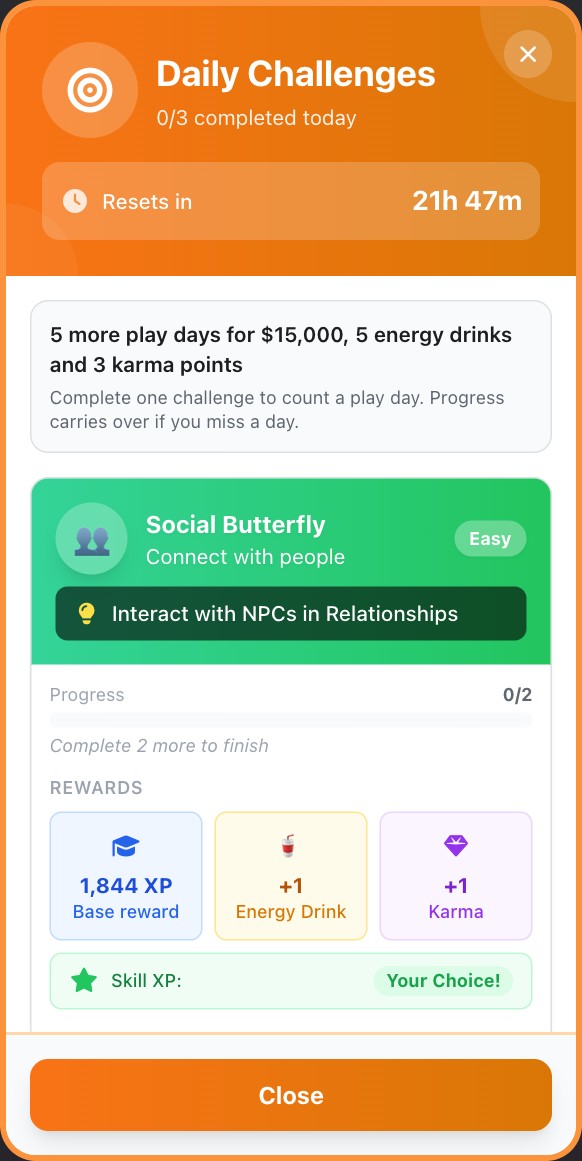
Look for the reset timer and the play-day reward above the Daily Challenge cards. The task and XP shown here are an example.
Check your minigame record
Open Communities, Minigame Mastery to inspect the games and your highest reached levels, using its category and ranking filters. Minigame levels are a separate record from your character’s skill levels. Continue through the school or work activities that launch those games.
Claiming challenge XP
Complete the displayed task, then choose Claim Rewards and a skill. The current reward picker offers the nine core skills. It does not offer Tennis, martial arts rank progress or the visible Happiness score. Read the actual reward card for the amount instead of assuming every task has the same reward.
What counts as a repeat
The repetition calculation looks at recent recorded activities and the ones that actually paid XP. Adults also accumulate a paid count for each activity within the character year. The variety bonus is about changing rewarded activities, so repeating an unavailable or failed action is not a reliable way to improve the next reward.
Related: Skills and XP, Character stats and achievements, Your first year.
Education
Where to find it: Open the education button on Home, then your school or an offered program.
Before you start: Admission depends on age, previous qualifications, grades and funding. Finish or leave an active enrollment before starting another.
Grades and degree progress
Scroll across to read the full table.
| Stat or rule | Value | What it means |
|---|---|---|
| GPA scale | 0.0 to 4.0 | A and A+ are 4.0, B+ is 3.3, C is 2.0 and F is 0.0. |
| School final GPA | 30% coursework and 70% final exam | The school bonus is added separately. This school formula is different from the credit-weighted higher education GPA. |
| Degree credit requirements | Community College 60; four-year college 120; Grad School 60; Medical School 160; Law School 120 | Credits are graduation progress. A good GPA does not replace missing credits. |
| Four-year college annual load | 36 credits per character year | This applies to the four-year college program. New Year starts the next allowance. A legacy enrollment with no recorded starting total remains uncapped until its next year turn. |
| Four-year college time limit | 5 enrolled years | At the limit, New Year checks graduation progress and can fail an enrollment that is still short of its required credits. |
| Higher education entry GPA weight | 30 graded credits | The GPA you enroll with has this weight in the average. These are not 30 credits toward graduation. |
| Played higher education activity grade | 1.0 + 3 × score ÷ 100 | A score of 0 gives that activity a 1.0 grade; 100 gives 4.0. The activity then joins the existing credit-weighted GPA. |
| Skipped higher education activity grade | At most C, or the current GPA if lower | A skipped activity cannot raise a GPA below 2.0 by awarding an artificial C. |
| Graduate Entry Prep | 20 energy and 5,000 | This action is for a completed bachelor's degree with an insufficient admissions GPA. The default admissions target is B+ (3.3). |
Schoolwork and GPA
Use the education button on Home; it may show your school, Higher Education or Continue Studies. In elementary, middle and high school, do schoolwork each year. Coursework raises GPA, while an underworked school year can lower it when that year ends. Your starting GPA carries into the calculation; grades are not a fixed count of activities. School sports commitments can also affect schoolwork.
Exams, transfers and conduct
Take the final school exam when your elementary, middle or high school offers it. For these exams, final GPA combines 30% coursework and 70% exam performance, with any applicable school bonus. Transfers and private schools have their own requirements and costs, which you can review before agreeing.
Your school screen shows conduct warnings and when a suspension ends. Skipping school, cheating or mistreating staff or classmates can bring a warning, detention, suspension or expulsion. Serious incidents can skip steps. A school year without further trouble can improve your standing.
Suspension keeps you enrolled but blocks school activities, school interactions and transfers for a year. It delays graduation, and New Year can continue even if a final exam would normally be due. If expelled, read the reason and return to Education. A different school or Night School may be available depending on your age. College and community college require a school diploma or equivalent.
Higher education and scholarships
For higher education, choose a program that fits the career you want, check admission and tuition, and earn the required credits. These programs use earned credits rather than the final school exam. Choose Graduate Now when eligible. Academic scholarships depend on grades; an athletic scholarship depends on a qualifying college team offer and continued eligibility.
College credits
A four year college degree normally requires 120 credits, with a limit of 36 credits per character year. Once the yearly load is full, more classes do not add credits until New Year. The 36 credit limit applies only to the four year college program. Older saves may start applying the yearly limit after their next New Year. Review tuition and any notices before advancing.
Read the activity result
In higher education, an activity can change both credits and GPA. Check both figures in the result. Performance and repeated activities affect the credits earned. Skipped work can earn participation credits, but its grade is capped at C or your current average if that is lower. Skipping cannot lift a weak GPA.
Return through Night School
Look for Night School in the adult education options. Pay the first year when enrolling and the second when requested. Complete the required activities across both years before the final exam. Waiting for two years or paying tuition alone does not unlock it.
Prepare for graduate admission
Graduate Entry Prep can appear when you have a completed bachelor's degree but your admissions GPA is too low for Grad School. It costs money and energy. Complete the preparation, then check the admission requirements again.
Two different credit totals
If you have earned 30 credits in the current four-year college year and an activity would otherwise award 12, the annual cap allows only 6 more. Advance with New Year before expecting a fresh 36-credit allowance.
For GPA, an entry average of 3.0 carries 30 graded credits. If your next awarded 10 credits have a 4.0 grade, the new average is (3.0 × 30 + 4.0 × 10) ÷ 40 = 3.25. The 30 entry credits are GPA weight, not degree progress.
Night School has an exam gate
The final exam requires two completed years, Year 2 tuition paid and the required activities completed. With the normal four-activity yearly allowance, that means eight activities across the course. Paying tuition or waiting alone is not enough.
Example: the final exam gate
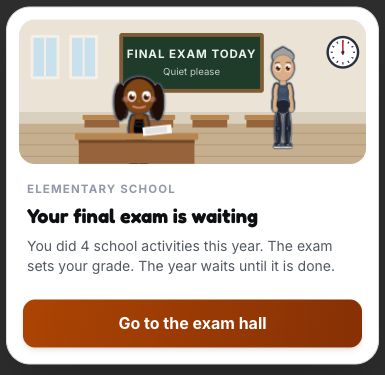
This sample school screen shows the coursework summary before the final exam. Choose Go to exam hall to continue.
Related: Skills and XP, Jobs and careers, Money and banking.
Jobs and careers
Where to find it: Open Career. Use Career Paths, Current, Apps and Pension to move between job screens.
Before you start: Standard job applications require a qualifying bank account. Check the role and company requirements, career restrictions and any hiring notice.
Work and retirement rules
Scroll across to read the full table.
| Stat or rule | Value | What it means |
|---|---|---|
| Concurrent standard jobs | 2 | Resign from a held job before applying for a third. Exclusive careers can prevent ordinary employment sooner. |
| Banking before applying | An active account or an account with a recorded balance that has not been closed | A frozen account can count even when you cannot access its money. Cash in your wallet does not meet this requirement. |
| Employment performance | 0 to 100 | Work results update the held job's own performance score. Each job keeps its own score. |
| Work activity energy | The activity's listed cost; 15 if no separate cost is supplied | Use the amount on that activity. There is no single cost for every kind of work. |
| Skill Challenge score | 0 to 100 | The score is normalized into this range. The actual performance gain also depends on fatigue and other work rules. |
| Work fatigue multiplier | max(0.05, 1 ÷ (1 + 0.08 × (session number − 1))) | The first work session of the character year has a multiplier of 1. Repeated work in that year reduces the gain, including the challenge bonus. |
| Ordinary retirement checks | From age 65 at New Year | The annual retirement event also checks business ownership, prison, wanted status and whether retirement was already processed. |
| Base annual retirement chance | Ages 65–69: 15%; 70–74: 30%; 75–79: 50%; 80+: 70% | These are the age bands before the health adjustment, not a promise that retirement happens at a particular age. |
| Retirement health adjustment | Health 70+: subtract 10 percentage points; health 40 or lower: add 15 | The final chance is kept between 5% and 85%. |
Choosing a career
Open Career to browse paths and companies. Standard job tracks include food service, retail, technology, business, education, medicine and law. If you need a bank account, open one through Assets. Read all displayed requirements, including age, qualifications, experience and any health, travel or background checks.
If your character is wanted, a valid Fake ID from the Black Market lets them apply for jobs as long as they meet the other requirements, including the bank account check. Their annual pay goes to the wallet while the manhunt freezes their accounts.
When an ordinary employer sees a criminal record, the interview includes a question about it and the score loses 10 points. A valid Fake ID hides the record from that check. For ordinary roles, a company you already work for skips the repeat check. Medicine, law and education still reject applicants with a conviction that has not been sealed or overturned, even with a valid Fake ID.
Applying for a job
- Choose a role and company your character can apply to.
- Complete the interview and review the offer, including pay and benefits.
- Accept a suitable offer, then do your work activities to maintain performance.
- Review promotion requirements and notices as your experience grows.
Performance and career changes
Poor performance can lead to warnings and dismissal. Salaries and offers depend on the role and company, so use the amount shown in your game. You can hold up to two active standard jobs, subject to career restrictions. If both slots are full, leave a job before accepting another offer. Some full time paths cannot be combined; the career lock explains which commitment you need to leave first. At New Year, illness and homelessness deductions stop at 55 performance points. Missed work and poor results can take the score lower.
Track an application and do the work
Apps holds your applications and offers. Applying does not start employment; you still need to complete the interview and accept an offer. After signing, open Current and select the activities for the job you want to work on. A work minigame can improve the activity result. If you skip it, read the result before assuming you earned the same performance bonus.
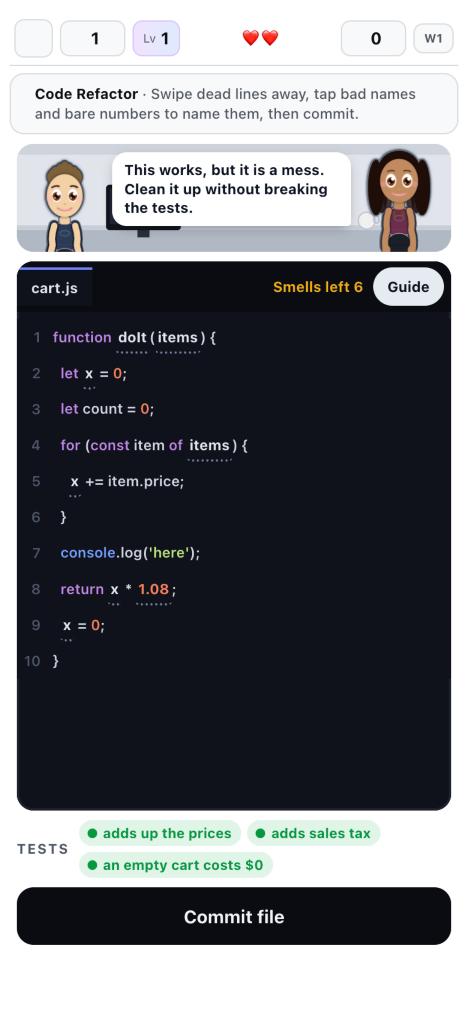
In the Software Developer work minigame, swipe away dead lines and tap names or numbers to clean them up before choosing Commit file.
Promotion and later life
Promotion reviews check the next role's requirements and the manager's decision. Work on the missing qualification or skill instead of assuming time served guarantees a promotion. From age 65, New Year can process retirement depending on age and health. Retirement is not guaranteed the first time New Year takes your character to age 65. Read the retirement notice and review your pension under Career, then Pension.
Read the work result
Work fatigue reduces the session calculation, while the final score change also depends on the job's level and any applicable mentor perk. A challenge score is not the number of performance points added. Promotion still checks the next role's requirements and the manager's decision.
Salary, interview requirements and available benefits depend on the actual role and company. Use the offer shown to your character instead of expecting one income for a whole career.
Related: Education, Skills and XP, Money and banking, Health and energy.
Streaming and content creation
Where to find it: Open Career, then Content Creator. Use Start Streaming or Record & Upload Video on your channel screen.
Before you start: Start from age 13 with a usable device. Ages 13 to 15 need the approval flow. Content also needs a joined platform, equipment and energy.
Creator entry and platform targets
Scroll across to read the full table.
| Stat or rule | Value | What it means |
|---|---|---|
| Starting age | 13 | You also need a usable device and must pass the career's current access checks. |
| Parental approval | Ages 13 to 15 | At these ages, complete the approval flow before starting. Age 16 removes this particular consent requirement. |
| Streamz Affiliate | 50 followers, 3 average viewers and 7 stream days | All three platform requirements must be met. |
| Streamz Partner | 5,000 followers, 75 average viewers and 12 stream days | This is a separate tier above Affiliate. |
| ViewTube Monetized | 1,000 subscribers and 4,000 watch hours | The platform checks both requirements. |
| ViewTube Premium Partner | 100,000 subscribers | This is the higher ViewTube tier. |
| ShortForm Creator Fund | 10,000 followers and 100,000 views | Both requirements apply. A large follower count alone does not complete this tier. |
| ShortForm Verified | 1,000,000 followers | This is a recognition tier separate from Creator Fund entry. |
| Total audience ceiling | 500,000,000 followers | Positive follower awards cannot take the career above this total. It is a limit, not an expected growth rate. |
Starting your channel
Choose Content Creator from Career. You can start from age 13. At ages 13 to 15, complete the chores shown before requesting parental approval; if permission is refused, wait until your next age to try again. Choose a niche such as Gaming, IRL/Vlog, Creative or React/Commentary and name your channel. You need a phone, tablet, laptop or PC. A phone must be working, charged and have an active plan whenever it requires one. Homeless characters need a portable device. You cannot start or create content while incarcerated.
Platforms and equipment
Join a suitable platform, check what equipment and energy your chosen content needs, then stream or record an upload. Streamz, ViewTube and ShortForm have different formats and monetization rules. Review each platform's progress requirements rather than assuming that followers alone unlock earnings.
Growth and sponsor offers
Upgrade the equipment you use, try different content and see how your audience responds. Sponsor offers have requirements and obligations; read those before accepting. Your earnings depend on your content and sponsor deals.
Choose a platform and format
Streamz is for live streams. ViewTube and ShortForm accept recorded content in their supported formats. Join a platform before trying to use it, then choose the content type and device setup. If Start Streaming or Record & Upload Video is disabled, read the message below that button. Losing device access or becoming homeless without a portable device can interrupt an existing channel too.
Keep sponsor work on track
Read the required work on each sponsor contract. A deal that requires a stream or upload checks whether you delivered that work during the character year. Signing the deal does not complete it. Missing the requirement can mean no payment and an ended contract at New Year. Check your content library and channel results before accepting more commitments.
Sponsor delivery is checked each character year
A contract requiring streams needs at least one live stream in that year. A content requirement needs at least one upload. Requirements that accept either are satisfied by a stream or an upload. Read the contract because the format matters.
A deal with no qualifying work pays nothing and ends at the yearly check. The stated contract payment is not guaranteed just because you accepted the offer.
Check progress on the platform
Tier progress reads the statistics of the joined platform. Streamz uses its live-stream figures, while ViewTube uses subscribers and watch hours. Device access, platform membership and energy remain separate requirements for making the next piece of content.
Related: Activities, Shop and items, Money and banking, Health and energy.
Martial arts and MMA
Where to find it: For classes, open Home, Extra, then Martial Arts. For professional fighting, open Career, Professional Sports, then Martial Arts.
Before you start: Classes start at age 4. Professional MMA starts at 18 and requires leaving current jobs, with career, travel and medical checks.
Classes, ranks and professional training
Scroll across to read the full table.
| Stat or rule | Value | What it means |
|---|---|---|
| Martial arts class entry | Age 4+ | Minors can still need permission and an available payer. |
| Professional MMA entry | Age 18+ | Current jobs must be left before applying. Career, travel and medical restrictions also apply. |
| Class energy | 10 per class | A gym contract can cover the fee, but it does not remove this energy cost. |
| Normal class fees | Boxing 100; Wrestling 110; Karate and Taekwondo 120; Judo 130; Muay Thai 140; Brazilian Jiu-Jitsu 150 | These are the class fees in the current action. An active professional gym contract waives the class fee. |
| Progress per belt or level | Karate 80; Judo 85; Taekwondo 90; Wrestling 95; Brazilian Jiu-Jitsu, Muay Thai and Boxing 100 | Each discipline has its own rank sequence and progress total. A pending rank test must be completed before another class. |
| Failed rank test | Lose floor(30% of current rank progress) | This reduces progress toward the next rank. It does not erase an earned belt. |
| Professional training energy | Strength 20; Stamina 20; Technique 10; Balanced 15 | These are the training card costs. Injury readiness can block a session. |
| Teammate sparring energy | 15 | You need an active fighting career and must pass the sparring readiness checks. |
| Gym contract changes | At most once at the same character age | An accepted contract checks whether a change was already made at that age. Other application and career checks still apply. |
Combat attributes and fighting styles
Scroll across to read the full table.
| Stat or rule | Value | What it means |
|---|---|---|
| Fitness | Up to 100 for this calculation; 0.30 Combat Power points per skill level | Comes from trained Fitness plus applicable equipped-item bonuses. Strength, Stamina and Balanced gym training award Fitness XP. |
| Discipline | Up to 100 for this calculation; 0.15 Combat Power points per skill level | Comes from trained Discipline plus applicable equipped-item bonuses. Technique and Balanced gym training award Discipline XP. |
| Resilience | Up to 100 for this calculation; 0.15 Combat Power points per skill level | Comes from trained Resilience plus applicable equipped-item bonuses. Strength, Stamina and Balanced gym training award Resilience XP. |
| Fighting | 0 to 100; 0.15 Combat Power points per Fighting level | Derived from your trained martial arts ranks and fight experience. Ranked arts are averaged, scaled to 100, then receive 20% of the street-fighting experience score, with the result capped at 100. Without ranked arts, the experience score is used. |
| Martial Arts Bonus | Up to 15 extra Combat Power points before age and body modifiers | Comes from the martial arts bonus calculation. This is an added point amount, not the specialist damage percentage. |
| Displayed Combat Power | Capped at 120 | The weighted skills and martial arts bonus are adjusted for age and body type, then rounded. The professional matchup also considers MMA experience, injuries and preparation, so this displayed number is not a win percentage. |
| Specialist style commitment | +8% damage on that selected art’s moves | Choose a trained specialist for the whole bout. Matching-art action effectiveness is multiplied by 1.08 on top of rank effectiveness. Basic attacks and other styles do not receive a universal 8% boost. |
| Hybrid Fighting | Access to Basic moves and all trained styles; −5% on trained moves | Hybrid uses 0.95 times rank effectiveness for art-specific moves instead of the specialist 1.08 multiplier. The move count depends on the styles you have actually trained. |
| Gym preparation | +6%, 0% or −6% against the opponent’s style | This is separate from the committed-style damage bonus. Preparation reads the dominant focus of the latest five gym sessions; a tie is Balanced Training. |
Training a discipline
Martial arts classes and professional MMA are different paths. For classes from age 4, open Home, then Extra and Martial Arts. If you moved it to the bottom bar, use Martial instead. Follow any parental permission requirements and check the class fee and energy cost. Complete a pending rank test before taking another class. Boxing, Wrestling, Brazilian Jiu-Jitsu, Karate, Taekwondo, Judo and Muay Thai have their own training paths.
Preparing for a fight
For professional MMA, open Career, Professional Sports, then Martial Arts. You must be at least 18 and resign from current jobs before applying. Another exclusive career, travel or medical restrictions, or application timing can block entry. Choose a gym, complete its application challenge, then review any contract offer before signing. Train and spar to prepare, read fight offers, and check your health and energy before competing. Read the fight instructions and choose your moves.
Injuries and progression
Fighting can cause injuries. Treat them and read any recovery restrictions before taking more work. A past win or a high general Fitness level does not replace the requirements shown for your next fight, division or contract.
Prepare a class and rank test
Each discipline keeps its own rank progress. Build that progress in classes and take the rank test when it becomes available. A failed test can reduce progress toward the next rank. Classes normally charge a fee; an active professional gym contract covers the class fee. You still need the energy and any parental permission required.
Book a fight carefully
Open Fight Offers & Schedule and use Pending, Completed or Declined to inspect your bookings. Read the opponent and scouting information before accepting. An accepted fight still needs Start Fight when you are eligible and medically cleared. Forfeit Fight adds a professional loss, so it is not a harmless way to remove a booking. Look for New Contract can also be unavailable after a contract change in the same age.
A rank and a professional record are different
Class progress belongs to the selected discipline. Completing its rank test advances that discipline's belt or level. Professional MMA has a separate contract, opponents and win/loss record.
Before accepting a fight, inspect the opponent and medical status. Forfeit Fight records a professional loss. Training does not make a previously accepted fight disappear.
What the 8% damage bonus means
The game plan’s +8% label belongs to a specialist’s own moves. For example, choosing Boxing applies the 1.08 multiplier to Boxing actions such as Jab, Hook and Uppercut. If the same qualifying hit would otherwise calculate 100 damage, that multiplier makes it 108 before later damage scaling or defense. It does not add eight percentage points to your chance of winning.
Hybrid keeps a wider move list but uses the separate −5% trade-off on trained moves. Gym preparation has its own +6%, neutral or −6% matchup effect. Read these labels separately instead of adding every displayed percentage into one guaranteed bonus.
The professional matchup uses another profile
The professional model also compares Skill, Stamina, Defense, Durability and Aggression. Their weights are 40%, 20%, 20%, 10% and 10%. The player’s professional career values are compared with the underlying fighting skill, Fitness, Discipline and Resilience values used by that profile. Training focus and injury or preparation modifiers are then applied. These adjusted profile values are not five extra skills you buy directly, and their modifier-adjusted values do not have a promised universal 100 cap.
The Combat Power formula
Base Combat Power = 0.30 × Fitness + 0.15 × Discipline + 0.15 × Resilience + 0.15 × Fighting. These are point coefficients, not shares of a total that must add to 100%. With all four values at 100, the base is 75. No Looks or Charisma term is missing.
Add the martial arts bonus, which is capped at 15 points. Then multiply by the age and body-type modifiers, round the result and cap the displayed Combat Power at 120. Professional fight readiness applies its own experience, injury and preparation adjustments, so the displayed value is not a win probability.
Example: choosing an MMA style
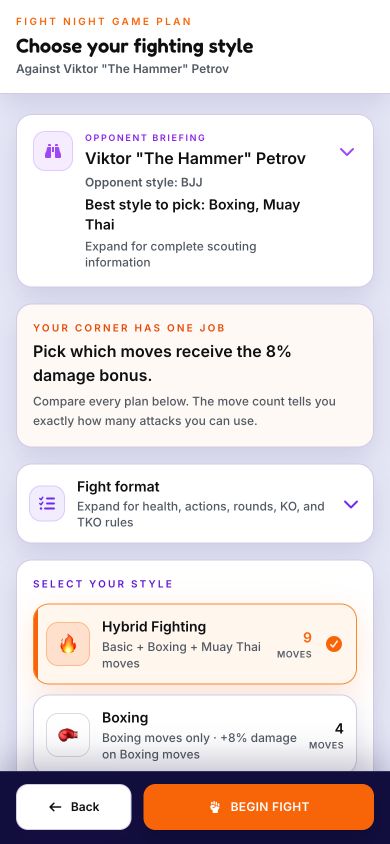
A sample fight plan. Hybrid offers Basic moves and trained styles with its trained-move penalty. The +8% labels belong to the specialist choices, as explained in the fighting-style table.
Related: Skills and XP, Health and energy, Jobs and careers, Money and banking.
Football and team sports
Where to find it: School teams are in School. Solo football training is under Home, Extra, then Football or Soccer. Professional football is under Career, Professional Sports.
Before you start: Football practice starts at age 5. Team and professional entry have separate age, permission, ability, medical and career requirements.
Football skills and match fitness
Scroll across to read the full table.
| Stat or rule | Value | What it means |
|---|---|---|
| Solo football practice | Age 5+ | This is the football-specific minimum. Joining a school side or professional club has additional requirements. |
| Football skills | 12 skills, each from 1 to 100 | Pace, Stamina, Strength, Dribbling, First touch, Passing, Finishing, Heading, Tackling, Vision, Positioning and Composure. |
| Playable positions | Defender, Midfielder, Winger and Striker | The overall rating weights the skills that matter to the selected position. Goalkeeper is not a player career position. |
| Fitness cap on Pace and Stamina | 35 + 0.75 × Fitness, before bonuses and other adjustments | For example, Fitness 60 gives an initial cap of 80. The game then applies the applicable fitness bonus, age and injury adjustments. |
| Growing body adjustment | Until age 17: −3 Strength and −2 Pace and Stamina for each year below 17 | This changes effective match attributes. It does not delete the trained attributes stored on the player. |
| Match fitness | 0 to 100 | Fixtures spend match fitness. Training uses energy instead, so low match fitness is not a second training-energy charge. |
| Recovery session | 10 energy; base recovery 22 match fitness | Recovery is scaled by Fitness and housing conditions and cannot exceed 100. At Fitness 50 with ordinary housing, the base recovery is 22. |
| A fixture not played | Base recovery 8 match fitness | This is also scaled by Fitness and housing conditions. It is different from spending energy on a recovery session. |
| Condition-related match injury risk | Starts below 55 match fitness | The chance rises as match fitness falls, with Fitness, age and health affecting it. Training has its own injury calculation. |
Joining a team
Football, called soccer in some regions, is open to new players. While at school, look for the team in the School screen. Read the tryout and permission requirements, then train, check your place in the squad, and play or simulate the fixtures offered.
Training and offers
At school, use the team's Training, Fixtures, Squad, Scouts and Offers information as it becomes available. Ability and form help your place in the side. Read academy, college and professional offers carefully: the route depends on age, region, eligibility and your actual record. In a professional football career without a club, use Offers, Trials, Training and Agent. After signing, use Team for training, drills, squad, offers and sponsors; Dashboard, then Matches, for games; Agent for your agent's inbox and contract; and League for the competition. Club contracts are under Team, then Offers, then Professional Offers. Academy invitations have their own Academy Offers category.
Review contract perks before signing, or open Agent, then Contract, to read your signed deal. If it includes a housing allowance, the club pays it with your wage. It counts as taxable pay, and some of the allowance can fall into a higher tax bracket. If your wage covers only part of the year, the same fraction applies to the allowance. A qualifying deal can also provide a club flat while it runs if you have nowhere to live.
Other sports
Basketball and Track and Field currently show Coming soon for newcomers. Existing active careers in those sports remain playable. If you already have one, follow its training, fixtures or meets, squad, offers and season information.
Matches and national teams
In professional football, open Dashboard, then Matches. Use All, League, Cups or International to browse fixtures. Under League, switch between Season and Play-offs. Dashboard also has Country when available, with Overview, Squad, Tournament and History. Read each national team call-up before accepting or declining. The invitation lets you choose Auto-accept future call-ups; change this later under Country using Auto-accept call-ups. Changes affect future invitations only. When a tournament is available, its Group, Knockouts, Your road and Leaders tabs show the competition and your country's progress.
Choose Play match when offered. On Match day, open Fixture when it appears and tap either club to see its starting lineup and player ratings. Controls shows the buttons or keys for your device. The camera follows your footballer during normal play and can zoom out to keep the ball in view. It follows the ball on a shot toward goal. While you are on the pitch, a countdown below the scoreboard shows what comes next in the final ten seconds of each period. In knockout matches, it can announce extra time, the break in extra time or penalties.
Read the ring around the opposing ball carrier. White means a tap steps you in. Red means you are in tackling range. Green marks a clear chance to take the ball. Tap Tackle for a standing challenge or hold it to slide. Barge appears when you are close enough, and Strength helps. When you take a free kick, use Shoot or Pass to aim from the spot. If you wait, the game takes the kick for you.
Watch the landing marker on aerial balls. Tap Head for a quick header, or hold to slow play and aim, then release. Near your own goal the button can read Clear. In a duel with your marker in front of goal, Heading makes up 70% of your aerial score and Strength makes up 30%. When a teammate has the ball, tap Call to ask for it. A dashed green ring marks the requested pass. Solid green means the pass was played to you. Red means the call was refused or went unanswered.
Move toward a loose ball or a rolling pass to meet it with your foot. First Touch helps with faster balls, which can still bounce away. A controlled ball at chest height drops toward your feet. Keepers can come out for loose balls in the box. When the computer chooses a pass, it gives a slight preference to onside teammates near either touchline. After an injury, the match can show whether the referee called a foul. If an injured player is replaced, play waits at the stoppage for the replacement to come on.
Returning to an interrupted match
If a match was interrupted, look for Match paused. Choose Resume to continue from the saved point, or Sim rest to finish it automatically. Later leaves a reminder with View match so you can return. If no match progress was saved, the buttons say Play match and Sim match instead. Finish the unfinished match before playing another fixture or starting New Year.
Train before the next tryout
Solo training lets you practise without joining a team. Choose a session and read its cost before starting. The fee and energy are spent when the session starts. Leaving the drill does not undo that cost. Follow any request for parental permission.
Read the new season results
Season results now use Overview, Stats, Squad and Rewards tabs. Only tabs with information are shown. Overview explains the finish, Stats shows performance, Squad reports changes and Rewards lists honours or payments. A professional season uses See what happens next to continue. Cup and country results can appear first with Continue. At school, answer any coach's question beneath the tabs before moving on.
Find the next competition
In Dashboard, then Matches, a filter can hide the next scheduled game. Use Go to next match when shown to return to the competition that is next.
Read the six card numbers
Pace is the Pace skill. Shooting averages Finishing and Composure. Passing averages Passing and Vision. Dribbling averages Dribbling and First touch. Defending averages Tackling, Positioning and Heading. Physical averages Strength and Stamina. These headline averages are rounded.
A position's overall rating uses all relevant football skills with more weight on its key skills. Training only a headline average can leave a weak skill that matters in an actual match.
Read the season sheet
Overview, Stats, Squad and Rewards are the current results tabs. A result shows only tabs with information. Finish any coach question or continuation step after reading the figures; opening a tab does not settle the next stage of the season.
Basketball and track and field remain unavailable to regular new players in this version. Existing active careers saved from earlier access can continue.
Example: football kickoff
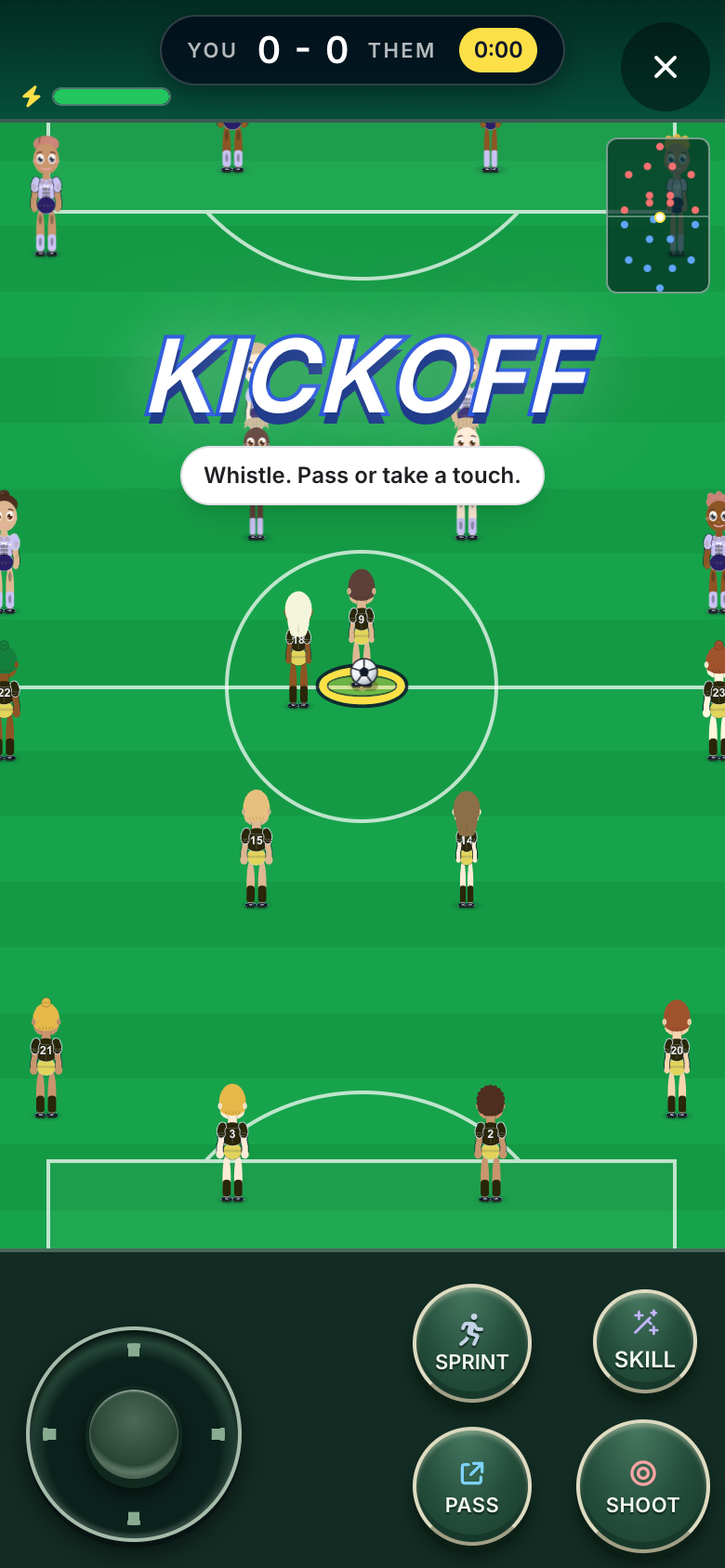
At kickoff, the match screen shows the score, clock, minimap and green action buttons. This example uses a sample fixture.
Related: Education, Skills and XP, Health and energy, Jobs and careers.
Tennis
Where to find it: Open Career, Professional Sports, then Tennis for the club and tour. Practice is also under Home, Extra, then Tennis.
Before you start: Turning professional requires age 14, Tennis level 35 and five amateur event wins, plus permission and career eligibility.
Tennis progression and seasonal limits
Scroll across to read the full table.
| Stat or rule | Value | What it means |
|---|---|---|
| Turning professional | Age 14+, Tennis level 35 and 5 amateur event wins | All three are required, along with permission and career eligibility. |
| Young professional event limits | Age 14: 6; 15: 8; 16: 10; 17: 13; age 18+: no age cap | This is the tour-event limit per season. The event's ranking cut and the rest of the calendar rules still apply. |
| Condition | 0 to 100 | Opening the next season restores full condition. It is separate from character energy. |
| Rest & Recover | 2 uses per season, up to 40 condition per use | A rest also advances injury recovery by one event. Recovery cannot take condition above 100. |
| Ranking point life | Earned season and the following season | A result from season A remains through A+1 and expires when A+2 opens. |
| Replaying a ranking event | One current result per event and circuit | The new result replaces that event's earlier result instead of adding another permanent copy. |
| Group Practice | 5 energy and a listed fee of 40 | This is the standalone training method. A scholarship waives its money cost; energy is still required. |
| Private Lesson | 15 energy and a listed fee of 180 | Other methods have their own fees, energy and skill gains. Check which training screen you are using. |
| Professional match-win XP | Futures 100; Challenger 110; 250-level 120; 500-level 130; Masters 145; Grand Slam 160 | This is Tennis XP per match won, paid when the tournament is finalized. This particular reward is not paid for qualifying draws. |
Tennis ability, freshness and ranking
Scroll across to read the full table.
| Stat or rule | Value | What it means |
|---|---|---|
| Tennis skill | Trained skill from 1 to 100 | Built through training and awarded match XP. Effective match skill also accounts for age, injury, court preference and applicable sponsor gear. |
| Fitness | Trained skill from 1 to 100 | Affects between-event condition recovery and injury risk. It is not the same number as Tennis skill or condition. |
| Condition | 0 to 100 | Season freshness falls through tournament rounds and recovers through rest or gaps in the calendar. The next season restores it. It is separate from the energy spent on training. |
| Court preference | Hard, clay and grass mastery each range from −3 to +3 | These values sum to zero across the three surfaces and modify effective Tennis skill on the current court. Surface training and competitive matches build progress. |
| Ranking points | Sum of the current results in the ranking ledger | Determine ranking and help decide event entry. Ranking and points are not inputs to the match win-probability formula. |
Choosing your route
You can join a school tennis team when eligible. For tennis practice from age 6, open Home, Extra, then Tennis, or use the Tennis bottom shortcut if you enabled it. The dedicated club and professional route is under Career, Professional Sports, then Tennis. These routes have different progress screens; read the permission and entry requirements for the one you choose.
Club training and turning professional
Choose a club you can afford, train and compete in amateur events. Turning professional requires age 14 or older, Tennis level 35 and five wins in amateur events. The Turn Professional screen tracks these requirements. Professional tennis is a full time commitment: check whether another job or career blocks entry, and read the resignation warning before confirming. Turning professional ends any current jobs and opens the tour calendar.
Tournaments and rankings
Enter tournaments you qualify for. If your ranking misses the cut, check whether a Qualify option is offered; winning that draw can secure entry. Professionals aged 14 to 17 have limits on tour events each season. Read the surface, draw and travel costs, play your matches and claim the result. Ranking points can expire, so review the points you need to defend. Treat injuries and manage condition between events.
Earnings and club membership
Tennis earnings include tournament prize money and payments from sponsor contracts you accept. Ranking influences sponsor offers; it does not give every player a separate automatic income. Eligible players on the wheelchair circuit may also receive programme funding. Club membership renews annually and can lapse if its payment fails.
Finish the event before checking your ranking
An active event stays on the tennis dashboard until you finish or withdraw. Use See Result when the run is complete. A title win may show a celebration before Continue settles the event. Ranking points and the final reward are not awarded simply because you entered the last round. If the ranking looks unchanged, finish the result screens before entering another event.
Choose the court and recovery
Court Preference shows your strengths and weaknesses on hard, clay and grass. Check the surface before choosing an event. Rest & Recover has a limited number of uses each season, and Condition Full means no recovery is needed. Read an injury's treatment details; treatment can shorten recovery without removing every injury immediately. If an event is locked by ranking, use Qualify only when that option is offered.
Points need defending
A title is not a permanent block of ranking points. The ledger keeps the result through the next season, giving you a chance to defend it. Replaying the event replaces its old points. Finish See Result and any Continue step so the new result is actually settled.
If your condition is 75, one available Rest & Recover use restores 25, not 40, because the cap is 100. The use is still spent.
Condition changes ability, not your saved skill
In the match simulation, condition scales the effective skill by 0.7 + 0.3 × condition ÷ 100. Full condition uses 100% of that skill, condition 50 uses 85%, and condition 0 uses 70%. Those percentages describe the skill used by the simulation, not the chance of winning. The opponent’s skill and condition still matter.
Your trained Tennis level remains the same when condition falls. Recover condition or choose a lighter calendar rather than treating low freshness as lost XP. Energy recovery and tournament condition recovery are separate mechanics.
Example: a tennis match
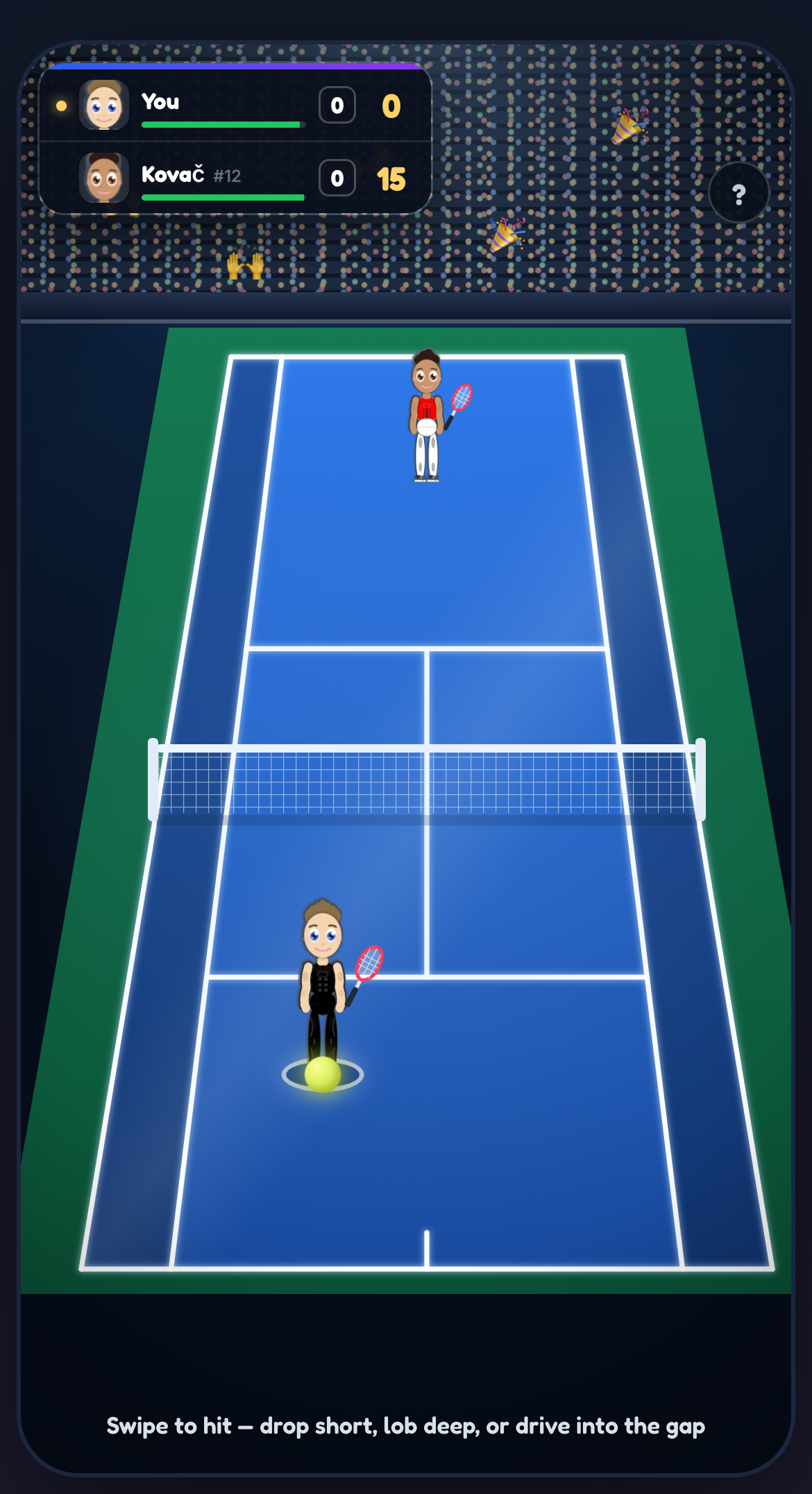
The court and point score during a tennis match. Match points, ranking points, trained Tennis skill and seasonal condition are separate readings.
Related: Skills and XP, Health and energy, Money and banking, Education.
Starting and running a business
Where to find it: Open Career, then Entrepreneurship. An open business has Overview, Shopfront, Operations and Finance tabs.
Before you start: You must be at least 18, have a Business Bank Account, leave current jobs and meet the chosen business's funding and career requirements.
Company progression and operating limits
Scroll across to read the full table.
| Stat or rule | Value | What it means |
|---|---|---|
| Starting age | 18+ | Open Career, then Entrepreneurship. Starting also requires an eligible Business Bank Account, startup funding and career eligibility. |
| Company level | 1 to 10 | Company level is separate from your personal Business skill. |
| XP for the next company level | round(500 × 1.5^(current level − 1)) | Level 1 to 2 needs 500 XP; level 2 to 3 needs 750. The company stops gaining level progress at level 10. |
| Work a Shift | 10 energy | Records one worked shift. Its benefit is included in the annual business calculations. |
| Equipment upgrade level | Up to level 10 | The maintenance screen offers upgrades below this limit. Required equipment must also be working for the shopfront to open. |
| Store limits at levels 1 to 5 | 1, 5, 15, 50 and 150 | The company's level sets the store limit. Other expansion requirements and costs still apply. |
| Store limits at levels 6 to 10 | 400, 1,000, 2,500, 5,000 and no level-based limit | Having room under this limit does not pay setup costs or remove operating costs. |
| Expansion readiness | Company level 2+ and average equipment condition at least 50% | These are checked alongside the store limit. Equipment below 80% can also increase setup cost. |
| Withdrawable profit | max(0, min(unwithdrawn profit, business account balance)) | The whole business balance is not automatically owner profit. The quoted withdrawal tax reduces what reaches your personal funds. |
Getting started
Find the business path in Career. You must be at least 18, have a Business Bank Account and leave any current job before opening a business. Another exclusive career can also block entry. Compare business types, starting capital and requirements. Put your startup contribution in the Business Bank Account. Review any startup loans offered before confirming; that account must cover the final startup charge.
Running the business
After opening, check the business's own dashboard. Hire suitable staff, assign work, maintain equipment and arrange products, services or stock where your business needs them. Marketing, suppliers, competitors and customer satisfaction all matter to different types of business.
Costs and expansion
Read the annual accounts before expanding. Revenue is not profit: wages, supplies, borrowing and other costs can use the money coming in. Keep personal funds and business funds in mind when choosing how to pay. Loans and expansion create obligations, and a business can fail.
Get the shopfront ready
If the shop cannot open, read its missing requirements before buying more stock. Check the product or service list, equipment condition and staffing of required areas for that business type. Hiring someone without assigning a required role may leave the shop blocked. A broken required item can also stop trading. Use the business's own stock, equipment and staffing controls to address the specific problem.
Add capital and take money home
In Finance, Capital lets you select personal funds and transfer money into the Business Account. Withdraw is different: it takes available business profit, with the withdrawal tax shown before settlement. The whole bank balance is not necessarily profit you can take home. Money left as working capital still pays the business's costs. Review the available amount and the business account balance before confirming.
Company XP example
Starting at company level 1 with no progress, 1,250 awarded company XP is enough to reach level 3: 500 for the first level and 750 for the second. This example uses XP already awarded after any applicable multiplier.
Expansion copies the flagship's equipment into the new stores. Check the actual plan for setup costs and added yearly running costs before confirming. Adding locations does not make their rent or staffing costs disappear.
Example: managing a shopfront
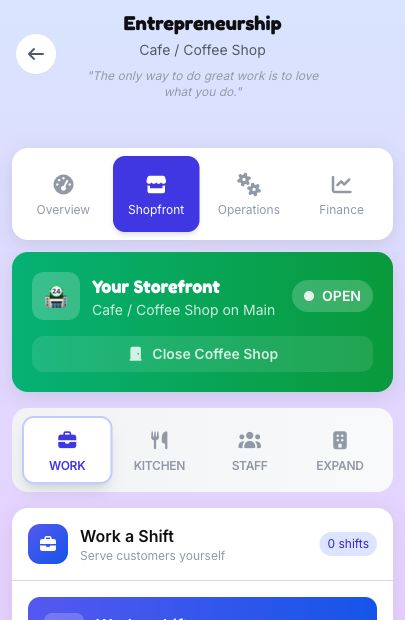
A coffee shop with sample business state. Shopfront, Operations and Finance cover different parts of the company; the values shown belong to this example.
Related: Money and banking, Jobs and careers, Investing, Shop and items.
Money and banking
Where to find it: Open Assets, then Banking for Accounts, Debts and Subscriptions. Pension management is under Career, then Pension.
Before you start: Account types have their own age and funding rules. Transactions need an eligible account with enough available money and no blocking restriction.
Banking, credit and pension rules
Scroll across to read the full table.
| Stat or rule | Value | What it means |
|---|---|---|
| Opening your own account | Age 16+ | Parent-opened and system-created accounts use separate rules. |
| Credit score | 1 to 999 | Your lending score stays within this range. |
| Unsealed conviction penalty | 25 credit points per counted conviction | This is applied when the lending score is calculated. Sealed records are treated separately. |
| Personal loan score floor | At least 450 and at least the lender's own minimum | Meeting the score requirement does not guarantee approval. |
| Personal loan account | An active personal account at the chosen lender | A business account does not qualify for the personal loan or receive it. |
| Loan affordability ceiling | 43% projected debt-to-income | A projected repayment ratio above this ceiling is refused. The calculation includes the proposed annual repayment; applicants without measurable income have separate handling. |
| Pension salary contribution | 1% to 15% | Enrollment and contribution changes keep the selected salary contribution in this range. |
| Manual pension contribution limit | 100,000 per character year | The action checks the year's amount already contributed. The public screen funds it from an eligible active personal bank account. |
| Ordinary pension payout age | 65 by default | Normal payouts check the pension's withdrawal age. Emergency withdrawal is a separate choice with its own deductions. |
Balances and payment sources
Your wallet and bank accounts are separate balances. Open Banking through Assets to compare account requirements, fees, interest and borrowing terms. You can apply for your own account from age 16; some parent-provided accounts can exist earlier. Make sure money is in the payment source an action accepts before buying or paying a bill. During a manhunt, your bank accounts are frozen and earn no interest. Check Assets, then Banking, for the freeze notice.
Borrowing and yearly costs
For a personal loan, you need an active personal account at the lender bank; a business account does not count. Review loans and yearly obligations before New Year. Borrowing is not free income: repayments and interest affect later years. Credit history and account eligibility matter, and missing an obligation can have consequences. Read the explanation in your game if a payment or transfer is blocked.
Choose where money goes
In Accounts, check which accounts receive income and pay bills. Earnings and recurring charges can use different accounts. Deposit, Withdraw and Transfer move money between specific sources; money elsewhere is not automatically in the account you selected. Taking money from savings can reduce the amount earning interest that year.
Review debts and plans
Use Debts to read repayment or early payoff options. Subscriptions lists your character's plans. Cancelling one stops the next yearly charge and does not refund the year already paid. These plans are separate from ChoiceFlow Plus membership.
Manage a pension
Career, then Pension, has contribution and fund controls. Make Extra Contribution requires enrollment or an existing pension balance, money deposited in an active personal account and space within the yearly contribution limit. Read withdrawal penalties and payout options before taking money out. Automatic offers to join an employer pension pause during a manhunt.
A limit is not an approval
A lender also checks the actual loan product, your account, income and existing obligations. The 43% figure is a refusal ceiling for the projected ratio, not permission to borrow any amount below it.
Pension contribution limits and retirement events are different rules. Age 65 does not promise that an ordinary retirement event will occur on the first New Year that reaches that age. Review the pension's actual payout and withdrawal choices.
Related: Jobs and careers, Starting and running a business, Investing, Saves, settings and getting help.
Investing
Where to find it: Open an eligible device's investment activity in Assets. The investment screen has Portfolio, Activity, Stocks, Crypto, Estate and Day Trade.
Before you start: Investing starts at age 18. You need a supported device, enough energy, the minimum purchase amount and deposited funds in an active personal account.
Investing and Day Trade reference
Scroll across to read the full table.
| Stat or rule | Value | What it means |
|---|---|---|
| Investment entry | Age 18+ | Use a supported device and deposited funds in an eligible active personal account. |
| Purchase energy by trained Intelligence | Below 20: 65; 20–39: 55; 40–59: 45; 60–79: 35; 80+: 25 | The purchase action checks and deducts this energy. Item bonuses do not replace the trained Intelligence used by this calculation. |
| Investment purchase amount | At least the selected asset's minimum | The normal investment amount is money to spend. Units are calculated from the current market price. |
| Purchase funding | One selected active personal account must cover the amount | The public investment picker excludes business accounts. Wallet cash does not fund the purchase. |
| Day Trade session length | 30 seconds | This timed session is separate from annual market changes. |
| Day Trade energy | 15 when the session starts | Closing early does not undo the energy spent. |
| Day Trade positions | 5 opened positions per session; one open position at a time | Opening a position uses one trade opportunity. |
| Day Trade amount | Minimum: the larger of 100 and the current share price rounded up; maximum: 1,000,000 or the selected balance, whichever is lower | The position uses whole shares. Enough account funds are still required. |
| Day Trade position result | Long: (exit − entry price) × shares. Short: (entry − exit price) × shares | This gives the position profit or loss before settlement deductions or tax treatment. |
Buying an investment
Investing opens from age 18 and requires an eligible trading device, such as a phone or computer. Investment purchases need an active bank account with enough money deposited for the purchase; cash in your wallet cannot pay. Compare the available stocks, crypto and property investments, then read the amount, price, energy cost and risk before confirming a purchase.
Market risk
Investment prices change in the game's simulated market as years pass. They do not track real market prices. Property investments belong to your investment portfolio; your character cannot move into them. Keep enough accessible money for living costs and commitments instead of assuming you can sell later at a profit. Market changes can reduce the value of a holding.
Choose the funding account
In Portfolio, use Buy with this account to select the personal account for a purchase. Business accounts are not listed there. The amount you enter is money to invest; the game calculates the units bought at its current price. Check the minimum and energy cost if a purchase fails.
Inspect individual purchases
Expand a holding to see its separate purchases, values and history. Several buys can have different purchase prices. Check the lot and quantity before selling, then read the proceeds and any tax. Activity helps you review changes without confusing cash income with a change in market price.
Try Day Trade
Day Trade opens a separate trading session with a funded personal account. Starting spends energy. Closing an active session early still settles its result after confirmation. Profits go to your income account; losses charge the account used for that session.
A Day Trade example
A long position of 10 shares bought at 100 and closed at 110 makes 100 before settlement deductions. Closing those same shares at 90 loses 100. A short position reverses that price difference.
After the timer ends, choose Collect Profits or Accept Losses to settle the result. Confirming an early close also settles it. Profits go to your income account, while losses charge the account selected for the session.
Related: Money and banking, Starting and running a business, Shop and items, Activities.
Housing
Where to find it: Shopping or Shop → Real Estate. Use Assets → Banking to review bill accounts and subscriptions.
Before you start: The property card checks its purchase or rental requirements, funds and any financing conditions. Rental applications also consider police status and pet policy.
Rent, upkeep and housing checks
Scroll across to read the full table.
| Stat or rule | Value | What it means |
|---|---|---|
| Rent while living with parents | Base 200 per month from age 18 | For an eligible adult living at home, the age multiplier rises by 0.1 each year after 18, up to 3 times base rent. An agreed stricter return-home deal can increase it further. |
| Yearly rental bill | 12 times the current monthly rent | The game charges the annual amount at New Year. Keep it in the eligible bill payment source. |
| Rental price review | Base change 1% to 3% a year; upward change capped at 3% | The economy and the rental tier alter the change. Budget, standard and premium tiers use multipliers of 0.85, 1 and 1.15. Read the new monthly figure; it is not a fixed rent forever. |
| Unpaid rent | Year 1 warning; year 2 final warning; year 3 eviction | The arrears system tracks unpaid years. The same three-stage warning ladder applies to eligible parent rent. Paying the rent matters more than an income warning alone. |
| Criminal-record rent premium | 25% more without a guarantor | A record does not permanently block renting. Being wanted by police does block the application. |
| Guarantor eligibility | Age 21 or older; Bonds level at least 60 | A living friend or family member with the required relationship can vouch for you. Their guarantee removes the criminal-record rent premium. |
| Annual item upkeep | Listed maintenance adjusted by the economy | Homes, electronics and lifestyle items use listed cost × (1 + economy percentage / 100), rounded down. Vehicles also include the transport-cost percentage. |
| Pet wear on housing | 10% of listed housing maintenance × weighted pets × property wear multiplier | This is additional annual wear, calculated separately for qualifying housing. Species and dog size affect the weighted pet total. |
| Moving to a newly bought or rented home | Previous rental ends | Buying or renting a new home removes the previous rental and stops the old parent-rent arrangement. It does not make your new bills free. |
Choosing a home
Open Shopping or Shop, then Real Estate, to review rentals and homes. Compare the initial payment with ongoing rent, maintenance and other costs. A home you can buy today may still be expensive to keep next year.
Moving and obligations
Check the property and household requirements before moving. Rentals have pet limits, so review housing before adopting another pet. Address rent warnings and housing problems when they appear; ignoring them can lead to losing your home.
Moving into a property
Taking a new rental or buying a home changes where you live and ends your previous rental. It also stops rent to parents. Check what you are giving up before confirming; buying a second property does not keep an old rental running.
Why a rental application can fail
Being wanted blocks a rental application. A past conviction is different: a close eligible friend or family member can act as guarantor, otherwise the landlord may charge higher rent. Pet limits and recent pet-policy problems can also affect the application. A paid Black Market Safe House can give you somewhere to live while wanted.
Keep the next year affordable
Review the account used for bills, not only your wallet. Rent, item upkeep, family obligations and subscriptions are separate charges. Living with parents can also become a paid arrangement. Catch up on arrears when warned; repeated unpaid rent can end in eviction.
When a rent notice appears and you have a bank account, choose Pay Now to review payment sources. In this example, checking covers the bill and the wallet falls short. The clip stops at the payment choice.
Read the property and bill together
The rent, upkeep and price shown for a property can differ from a basic catalogue amount. The tables use game-money amounts; use the currency and final charge displayed in your life. A rental has its own pet limit and wear multiplier, so do not assume every landlord allows two pets.
- For pet wear, a medium dog counts as 1 weighted pet, a cat as 0.9, a rabbit as 0.6, a bird as 0.4, a hamster as 0.3 and a fish as 0.2. Large dogs use a 1.2 size multiplier and giant dogs 1.35.
- Prison pauses electronics and vehicle upkeep, but housing tax and utilities continue.
Related: Money and banking, Shop and items, Pets, Travel and places around town.
Relationships and dating
Where to find it: Relationships or Bonds → person → Romance. Dating App: Assets → an eligible owned phone or computer → Dating App.
Before you start: Romance needs age eligibility, a met and compatible person, and consent. Distant or unavailable people can have additional contact restrictions.
Romance entry and date rules
Scroll across to read the full table.
| Stat or rule | Value | What it means |
|---|---|---|
| Minimum romance age | Both people at least 16 | The age check is applied before a new romance can be offered. |
| Minor/adult pairing | A 16–17-year-old can date only another minor | Reaching age 18 changes the allowed age group. |
| First-contact requirement | The person must be met and present in the relationships system | A distant profile or an unintroduced encounter is not automatically a romance contact. |
| Initial feelings gate for an uncommitted person | Trust or affection at least 40, and relationship level at least 20 | Consent and other eligibility rules still apply. Existing linked partners and affair routes have different checks. |
| Make it official | 100% of the required Love Task progress | Progress for this step is derived from completed tasks for the required count. More ordinary dates do not substitute for unfinished tasks. |
| Date prices | Casual 50; Dinner 100; Adventure 150; Fancy 250 | Amounts use the character’s money units. The selected payment source must cover the accepted date. |
| A declined date invitation | No date payment | A declined invitation is not charged. It can still affect the relationship. An accepted date can have a poor outcome. |
| Consent and family restrictions | Required eligibility checks | High feelings do not override consent, a close family relationship or contact restrictions. Opening an existing partner’s menu does not guarantee consent to every action. |
Building connections
Open a person's profile to see the interactions available to your character. Conversation, time together and considerate choices can build trust, affection and respect; hurtful choices can create resentment. People's relationship status and what has already happened affect their responses.
In Bonds, the raised hand on a contact’s card opens a favour when one is available. Check what it costs before helping. Completing a favour can improve the bond. If you cannot do it, the offer stays open and the game shows why.
Dating and commitments
Romance starts at age 16. Characters under 18 can date only other characters under 18. You must have met the person, satisfy the relationship requirements and have their consent. Family relationships block romance. Existing partners can change the available choices and create affair consequences. For someone far away, check whether the action needs a working communication device or an in-person visit.
Meet a match, then build the relationship
From age 16, the Dating App action on a supported device lets you browse profiles. Connecting introduces that person and opens Relationships, Romance. An introduction is not a completed relationship milestone. Open their card and choose Romance to see the next available step.
Within Romance, use Go on Date and Love Tasks. Check the date’s price and payment source. Relationship stages need their own progress and tasks, so a high affection score alone does not complete the next stage.
Tap the info button beside What Happens Next to read what an introduction does before you choose Meet Match. The match shown is an example.
When a person or action seems missing
Check the relationship tabs and filters, including hidden people, before assuming a contact has vanished. Open the person’s card to read any restriction. Someone in another city may need a call or visit rather than an ordinary local interaction. A usable communication device and the offered travel arrangements can matter.
Invitation, payment and outcome are separate
The game first asks whether the person accepts. It then checks and charges the selected payment source, then resolves the date. A successful invitation therefore does not guarantee a wonderful date. Complete any active Love Task’s actual objectives, including the required type of date and successful result where specified.
Related: Marriage, children and custody, Travel and places around town, Shop and items.
Marriage, children and custody
Where to find it: Relationships or Bonds → partner → Romance → Marriage. Child planning: child’s card → Invest in their name. Visits: co-parent’s card → children panel.
Before you start: Marriage requires both people to be at least 18 and engaged. Child planning needs an eligible reachable child aged at least 5 and a player who is not imprisoned.
Family eligibility and costs
Scroll across to read the full table.
| Stat or rule | Value | What it means |
|---|---|---|
| Marriage or engagement age | Both people at least 18 | Other marriage and relationship requirements must also pass. |
| Proposal readiness | Relationship score at least 60, plus the required relationship and task state | The proposal controls require a serious partner and relevant completed Love Task progress. A player proposal also needs an owned engagement ring; an NPC proposing uses their own. |
| Starting a pregnancy | Carrier aged 16–45; inseminating partner at least 16 | Compatible reproductive roles and conception/consent conditions also apply. Display gender alone does not establish reproductive role. |
| Existing pregnancy at New Year | Due during that advance | The annual update marks existing pregnancies as due; birth and care decisions must be resolved. This does not guarantee a complication-free birth. |
| Adoption application | Age 21+, a home and at least 5,000 available funds | Imprisonment and wanted status block the application; other screening factors can affect matching. |
| Adoption placement payment | 2,000 from the wallet per child | The application’s available-funds threshold and the wallet charge at placement are separate checks. |
| Paid child schooling plans | Child ages 5–17; at most 5 enrolled activities | School tuition and enrolled activity fees are annual. Adult children retain tracking and relevant university options rather than the minor schooling plan. |
| Child path outings | At most 2 per child per character year | Outings have their own fees and eligibility. The yearly cap does not mean every outing is free or automatically successful. |
Marriage and separation
To propose, both people must be at least 18, free to marry and in a serious relationship. Complete the required Love Tasks. A proposal you make needs an engagement ring; an NPC proposing brings their own. You must be engaged before marrying. Review surname and prenup choices before confirming. Marriage can change family and financial responsibilities. Divorce can involve assets, pensions, support and custody, so read the terms shown for your family.
Children and custody
Pregnancy depends on fertility and compatible reproductive roles. The person carrying the baby must be aged 16 to 45. Marriage is not required. Read the choices about naming, involvement and care when offered. After separation, follow the custody arrangement, visitation and child support notices. Children and their other parent have their own circumstances, including travel when they live far away. An announced pregnancy can appear on the person’s Bonds card even when the relationship is below the usual friendship threshold.
When the naming screen appears, type a name or choose a suggestion, then select Confirm Names. This screen shows a sample birth.
Adoption
From Home, open Extra, Travel and the Adoption Centre. To apply, you must be at least 21, have a home and at least 5,000 in available funds, and be neither imprisoned nor wanted. Single applicants can apply. Income and convictions affect matching rather than automatically disqualifying you. Complete the interview and wait for a match; placement costs 2,000 per child. The game displays these amounts in your character's currency.
Plan a child’s development
Open Invest in your child and use Summary, Plan and Skills to understand their development. While they are school-aged, compare school tracks, tuition tiers and activities in Plan. Tuition and enrolled activities create annual charges, so a displayed yearly benefit also means a continuing commitment.
At adulthood, schooling plans stop being available. You can still inspect their skills and university status, including any reconsideration option the game offers.
Arrange contact after separation
If a minor child lives with the other parent, direct interactions can stay locked until a visit is arranged. Open that co-parent’s children panel. Where required, request Visitation Rights first; then select eligible children and Request Visit. Read travel charges for children living elsewhere. A request can be refused, and the interface shows when another request must wait.
Childcare costs are not a single fixed fee
Raising costs, school tuition, activity fees, child support and visitation travel are different obligations. School track and tier, chosen activities, custody/residence and family finances can change what is due. Review the child and co-parent screens rather than multiplying one quoted fee by every year.
Related: Relationships and dating, Money and banking, Death, wills and inheritance.
Crime and prison
Where to find it: Activities → Crime. Home → Extra → Criminal Record or Black Market. While imprisoned, use the prison screen.
Before you start: Street crimes have separate age, energy and equipment requirements. Black Market access has its own discovery and unlock rules. Prison actions require an active sentence.
The prison year
Scroll across to read the full table.
| Stat or rule | Value | What it means |
|---|---|---|
| Ordinary activity slots | 5 per character year | Rest does not use one of these slots. Solitary confinement can block access to activities. |
| Good-conduct credit | First 3 successful good activities per year | Later good results do not keep raising the rating. Doing fewer than 3 non-rest prison activities causes an idle penalty at New Year. Gang misconduct does not count as good conduct. |
| Prison Workshop | 25 Energy; base earnings 40 to 100 | Base Discipline XP is 800 to 1,800 and Fitness XP 400 to 800. Activity streaks, XP modifiers and the actual outcome can change the final result. |
| Education Classes | 15 Energy; 1 sentence-reduction credit per year | Base Intelligence XP is 600 to 1,400. More classes can still grant other results, but only the first class that year can reduce the sentence. |
| Yard Time | 20 Energy | Base Fitness XP is 900 to 2,000 and Discipline XP 300 to 700. Its behavior outcome can be positive or negative. |
| Social Time | 10 Energy | Base Charisma XP is 600 to 1,400. Social activity can improve or damage behavior; the result is not guaranteed to be good. |
| Rest in Your Cell | 3 rests per year; restores 25 to 35 Energy | The gain is capped at your current energy ceiling. A rest at full energy is refused without spending a rest. |
| Appeal fee and waiting period | 5,000 + 1,000 per remaining sentence year; 4-year cooldown | The fee comes from wallet money and is paid on a successful or denied appeal. Overturning one conviction can leave time on other sentences. |
| Appeal chance | 10% minimum; 90% maximum | The starting chance is 30%, adjusted by behavior and the proportion of the sentence served. Paying the fee never guarantees release. |
Street crime
Find street crime under Activities, then Crime. Each crime has its own age, equipment and energy requirements. Read the target, possible reward and risks before acting. Crime can bring police attention, loss, injuries, legal proceedings and prison; an advertised reward is not a guaranteed payout.
When a contact offers Fight, the challenge shows both fighters’ combat power and any weapon selected. Under Bring a weapon, choose Fight unarmed or an eligible item you own, such as a Baseball Bat, Knuckleduster or Combat Knife. Review the matchup before choosing Start Fight.
Criminal organization availability
Street crews, criminal organization careers and territory management are unavailable to regular players. Prison gangs have their own membership and rank. You can join one while serving a sentence.
While imprisoned
Open Overview to check your estimated release age, time served, behavior and parole readiness. Open Sentence and convictions to see Still to serve and Completed, then expand a conviction for its recorded details. Use File Appeal under Lawyer appeal, or See Doctor under Prison medical for free treatment.
Use Overview to check when your character could leave prison. The release estimate and parole eligibility shown are for a sample sentence.
If your character chose Other and you see Prison intake, choose Female at birth or Male at birth. The game saves the choice for prison placement and fills the Inmates list for your wing.
In the Inmates tab, search by name or filter by gang or loyalty where available. Open an inmate’s card to see which interactions are available.
In Overview, choose Organize Prison Riot after serving at least a year and when you are out of solitary. You can attempt it once per character year.
You can attempt the riot on your own. If inmates from your prison gang are available, Send all crew lets them draw guards while you head for the orange door. Up to four gang members can help.
Getting caught during the riot adds 10 to 25 years and a year in solitary, and resets your behavior rating to zero. Escaping starts a manhunt that goes cold after 20 to 40 years if you stay free.
Criminal record and Black Market
From Extra, open Criminal Record to review police heat, arrests and past convictions. Look for Black Market in Extra once your character has discovered it. Access normally opens after 15 recorded crimes, or you can pay a fixer 8,000 from your wallet using a device with internet access. Read the cash price and risks before buying. Item purchases can trigger an undercover sting, and an open court case can block them. Confirm Black Market services before paying from your wallet. Black Market access is separate from criminal organization careers.
Under Safety, a Safe House costs 25,000 a year. You move in if you have nowhere to live or are staying at your parents’ watched home during a manhunt. Rent renews from your wallet at New Year. Stop renting keeps the rest of the paid year and cancels renewal. Stay on cancels that notice. The rental also ends if you cannot pay or the rent comes due in prison.
Under Identity, a Fake ID costs 20,000 and lasts five years. You can renew it in its last year. Under Tools, a Disguise Kit costs 5,000.
Tap the On the run banner to see the manhunt countdown. Police watch people you knew before escaping. Chat, Financial and Ask to Move Back In can expose you, and staying at your parents’ watched home carries a risk each New Year while the manhunt continues. The capture chance for a watched contact is 30% by default. A paid Safe House lowers it to 10%, and a valid Fake ID halves either chance. Where offered, a Disguise Kit skips one contact check.
Use Turn in on the On the run banner to surrender. The confirmation shows the 5 to 10 year range for the escape charge and any time you still owe. The return card shows the result and your expected release age.
The target changes the job
For crimes that offer targets, compare the choices before committing. The target you pick determines the possible loot and police consequences. Being caught opens the investigation and legal process; a failed attempt can leave consequences without giving you the advertised reward.
Use the prison year carefully
In Activities, switch between Personal and Gang. Prison Workshop can earn money, Education Classes build skills, and Yard Time and Social Time have their own costs and results. The result shows the cash, behavior, skill XP and sentence changes that apply. When you gain skill XP, check for a level change or XP remaining to the next level.
Activities use limited yearly slots as well as energy. Rest in Your Cell has a separate yearly allowance and uses no activity slot. Power Nap also appears on the prison screen when you have naps available. Solitary confinement blocks normal prison activities.
Choose Fight on an inmate’s card when offered. Adults in adult prison can select a Shiv or Yard Stone they own, or fight unarmed. If you win and your opponent survives, you can let them go with a warning. Between adults in adult prison, you can also continue the beating or choose to injure them severely, risking lasting harm or death.
Prison gangs and release
In the prison Activities tab, open Gang and choose Join a Gang. In juvenile detention, choose Smuggle Contraband as your initiation, then complete Initiation: Smuggle Contraband in Activities. The separate solo smuggling activity does not count.
To found a gang, use Make Loyal on inmate cards once your relationship reaches Friends (41 or higher). Check the cost and odds before paying from your wallet. You lose the payment if they refuse. With at least three loyal followers and no current gang or initiation, choose Start Your Own Gang to become its leader. Leaders can use Recruit to Crew on loyal inmates when the gang has room.
In Gangs, open Your Gang to see your rank and gang XP. New recruits start as Members. Completing initiation grants 3,500 to 3,900 base gang XP before modifiers. Enforcer requires 10,000 XP and Lieutenant requires 18,000 XP. A lieutenant with at least 27,000 XP can choose Challenge Gang Leader when available. You need a living leader on your wing and must be out of solitary. Review the matchup and choose available pledged backers. The leader can have backers too, and either side can be hurt before the fight starts. Adults in adult prison can borrow a shiv from the gang or bring an eligible weapon they own.
Losing the leadership fight can bring demotion, a beating, expulsion or death. If the old leader survives your victory, you can kick them out. Between adults in adult prison you can also choose to scar or kill them. Violence can bring an investigation or added time. A conviction for killing the old leader can revoke any pending inheritance from them.
In Your Gang, cash gifts can build your personal bond with a gang member. Each gift is at least 100, with a limit of 10,000 per inmate per character year. Once you are friends, you can ask for a personal pledge without asking the inmate to leave the gang.
Leaders can use Order on a member to set, change or cancel a standing job. Each eligible inmate tries one order per character year. If they already tried this year, a changed order starts next year. Gang Year In Review shows each job’s result and any changes to earnings, reputation, heat or loyalty.
Nonleaders in established gangs can lose their place if they complete fewer than two counted gang activities, such as workouts or meetings, in a year. A year already spent in solitary is excused. Overview shows the remaining solitary term. For leaders, doing fewer than three counted gang activities in a year can weaken their gang’s reputation, control and loyalty. Nonleaders can use Leave Prison Gang from Your Gang. Leaving ends gang protection and risks retaliation.
If you turn 18 while still serving a juvenile sentence, you transfer to adult prison to serve the remaining time. If your gang operates there, the group in the adult facility recognizes your rank. If you lead a gang, loyal members may rejoin you as they turn 18 if they are still serving.
A normal release ends your prison gang membership. If you return to custody while still wanted after an escape, an established prison gang can restore your gang XP and rank. Former leaders of those gangs return as Lieutenant. If you escaped as leader of a gang you founded, you can lead it again if at least one member is still on the wing.
Education credit gets smaller over a long sentence
The first three credited education reductions of a sentence each use 5% of the current total sentence. Later credited reductions use 2.5%, 1.25% and then halve again. Reduction is rounded to a tenth of a year and cannot remove more time than remains. This is separate from the one credited class per year.
Parole hearings
To qualify for a parole hearing, serve at least 40% of your adjusted sentence, rounded up to a whole year. Finish two consecutive years with a behavior rating of 80 or more. If your adjusted sentence is 12 years, you must serve at least five. Once eligible and out of the cooldown, you have a 20% chance of a hearing at New Year while you are still serving.
The hearing has five questions. Your record determines whether you need three, four or five correct answers. If the Board decision grants parole, choose Start Your New Life to leave prison and continue with the same character. A denial starts a cooldown of four years.
Related: Activities, Health and energy, Money and banking, Relationships and dating.
Health and energy
Where to find it: Stats → Health → Visit Doctor. Lifestyle & Habits is lower on the same Health screen; Power Nap appears on Home or on the prison screen when available.
Before you start: Care depends on the active diagnosis or injury, provider, coverage and payment source. A treatment must be chosen for each selected condition before review.
Energy and consumables
Scroll across to read the full table.
| Stat or rule | Value | What it means |
|---|---|---|
| Energy capacity | Base ceiling 100 | Lasting medical impairments can reduce the ceiling. Suitable medical aids that are actually in use can mitigate the relevant loss. A refill stops at your current ceiling. |
| Power Naps | 2 per year; 6 with verified Plus; 15 to 25 Energy per nap | New Year refills the yearly allowance. Earned spare naps are a separate stockpile and keep until used. Near full energy, part of the rolled gain is lost. |
| Shared stimulant allowance | 6 weighted units per character year | Sweets, soda, cafe coffee and cigarettes each use 1 unit. Pulse Spark uses 2, Apex Charge 3 and Ember Shot 500 uses 4. Changing item type does not reset the shared total. |
| Stimulant cost after the allowance | 7th unit costs 1 Health; 8th costs 2; shared cost capped at 15 Health per item | Add the costs of all units used by that item. For example, a 4-unit item taken after 4 units has a shared cost of 3 Health. Every cigarette also costs 1 Health for lung damage, including within the first six units. Addiction, heart and lifetime effects can add further consequences. |
| Protein Powder | First 3 scoops per year: up to 10 Energy and 3 Health each | Energy and Health stop at their limits. A fourth or later scoop is still used up but gives neither benefit. |
Diet at New Year
Scroll across to read the full table.
| Stat or rule | Value | What it means |
|---|---|---|
| Healthy Diet | 10 healthy meals that year OR Healthy Diet progress at least 60 | Also requires fewer than 5 junk-food meals, Junk Food level below 40 and Sugar level below 60. A qualifying year gives 3 Health. Levels are checked after annual decay. |
| Unhealthy Diet | 10 junk-food meals OR Junk Food level at least 60 OR Sugar level at least 80 | A qualifying year loses 3 Health, increasing to 5 after 3 consecutive unhealthy years. The healthy check is evaluated first. |
| Annual habit decay and nutrition plan | Junk Food −10; Sugar −25; Healthy Diet progress −15 | An active Professional Nutrition Plan then holds Healthy Diet progress at a minimum of 50. That floor alone is below the 60-point route to a healthy year. |
| Healthy Meal | 2 Health; 3 Happiness; 12 Healthy Diet progress | One meal also reduces accumulated Junk Food by 5 and Sugar by 8, stopping at zero. Healthy Diet progress stops at 100. |
Health and treatment
Read symptoms, diagnoses and injury notices. Visit a doctor or other care option when needed, review the consultation and treatment cost, and follow any treatment or recovery plan. A visit does not guarantee that every condition will disappear.
An eligible teen can be asked to cover part of their care. This example shows what the parents can pay and how much would come from the teen’s own money.
Managing energy
Energy pays for many actions, so keep some for important commitments. New Year restores it to your current capacity, but lasting impairments can lower that capacity and annual medical effects can reduce the energy left afterward. Items that restore energy cannot raise it above your current capacity. Read their use limits and warnings: repeated use can cost health, and some energy drinks in the game can cause a heart attack. Illness, injury and exhaustion can affect work or training. Sports condition is separate from energy.
Death and legacy
Characters can die through age, illness, injury and other events. Read serious warnings and care choices when they appear. Death ends that character's playable life; available continuation and legacy choices depend on the family left behind.
Body differences and medical equipment
Body at Birth lets you choose body differences when creating a character. During play, open Stats, then Health, to read how your character's body and medical conditions affect daily life. Where equipment is available, compare its effects, free or paid options and any payment plan before choosing it. Fitted equipment can be taken off or put back on from the same health screen. Wearing different equipment can change which activities your character can manage.
Check the plan before starting care
Choose the conditions to address, choose their treatments, then open Review plan. Check the total, coverage, payment source and any renewal choices before Start care. Chronic care manages a condition rather than promising a cure. Read the resulting care status before buying another course.
Diet comes from what you do
Lifestyle & Habits shows diet, exercise habits and addictions. Open Current Impact for the explanation. Healthy meals, junk food and sugar affect diet over time. Workouts do not cancel an unhealthy diet. An active nutrition plan supports diet progress, but does not automatically make every diet healthy.
Rest is limited by the game year
When Home or the prison screen offers Power Nap, check the remaining allowance. Yearly naps return at New Year; earned spare naps are a separate stock. Waiting in real time does not refill the yearly allowance. Avoid wasting a limited recovery option when your usable energy is already close to full.
Read Lifestyle & Habits in Stats, Health
Active Lifestyle needs 4 yearly exercise credits and is lost if the credit total drops below 4. Repeating workouts in one year does not substitute for keeping the habit across years. Exercise does not cancel an Unhealthy Diet result.
- Nicotine falls by 20 per year normally. A year-end level of at least 50 costs 3 Health and 50 Charisma XP. Leaving the Smoker state can bring withdrawal with 20 Stress and 10 Happiness lost.
- Alcohol normally falls by 15 per year. At level 60 to 79 it costs 2 Health, 50 Intelligence XP and 50 Charisma XP at year end. At 80 or more it costs 4 Health, 100 Intelligence XP and 100 Charisma XP. These XP losses stop at zero; they are not fixed losses of whole skill levels. Leaving the Drinker state can bring 25 Stress and 15 Happiness lost.
- These annual level checks happen after natural decay. Prison changes substance decay. The six shared stimulant units are not an exemption from these separate habit effects.
Treatment is not a guaranteed cure
Review the selected condition, provider, coverage and payment before Start care. Chronic conditions use management and renewal rather than an instant cure. Eligible acute courses lasting 12 months or less resolve their treatment roll when purchased. A failed eligible session can be tried again with another paid session and a new roll; longer courses and other care types have their own timing. A single fixed cost or success percentage would be misleading across all conditions and countries.
Example: the seventh stimulant unit
This sample starts after six shared stimulant units have already been used that character year. One soda adds 12 Energy and costs 1 Health here. The next shared unit would cost 2 Health; item effects and available capacity can change the actual gain.
Related: Character stats and achievements, Activities, Shop and items, Gambling and the casino, Death, wills and inheritance.
Pets
Where to find it: Home → Extra → Pets, then Dogs, Cats or Small Animals. Open a pet to see its care and health actions.
Before you start: Purchase or adoption is blocked below age 6; minors need parental approval and enough available care funding. Rental rules still matter. Dog and cat training also checks player and pet age.
Pet stats and training
Scroll across to read the full table.
| Stat or rule | Value | What it means |
|---|---|---|
| Happiness | 0 to 100 | Feeding, play and other care raise it. Dog annual base decay is 15 before care, personality, age, hunger and illness adjustments. Low happiness can lead to behavior problems or a runaway. |
| Health | 0 to 100, with a lower recovery cap for some elderly dogs | Food, walking, play and appropriate vet care can help. Dog annual base decay is 5; disease, hunger and old age can add further losses. |
| Bond | 0 to 100 | Dog walking adds a base 5 and play a base 8, each modified by personality. Without a walk or play that year, a dog loses 5 Bond if it had other care, or 10 if it had no care. |
| Fullness | 0 to 100; higher means better fed | Basic, standard and premium dog food restore a base 20, 40 and 60 Fullness. Dog annual base decay is 25; feeding in the year reduces that decay by 15. |
| Grooming or Cleanliness | 0 to 100 | Grooming a dog adds 20 Grooming, 5 Happiness and 3 Bond. Dog Grooming normally loses 20 each year; grooming in that year reduces the loss by 10. Companion species use Cleanliness instead. |
| Dog and cat training entry | Player age 15 or older; pet age at least 1 | The pet must be living and active. Costs and energy still apply. Competition entry has additional skills, bond, health and category checks. |
| Training levels | Levels 0 to 5 at 0, 100, 300, 600, 1,000 and 1,500 total XP | The base session award is 50 XP before breed, equipment, character and other applicable modifiers. A session does not always give exactly 50. |
| Released dog training sessions | Ringcraft: 50 money / 8 Energy; Agility: 40 / 10; Obedience: 35 / 8; Rally: 30 / 8 | These are per-session base fees in game money. Conformation and Working Trials depend on the unavailable dog pack and are not included as open options. |
| Cat training sessions | Showmanship: 50 money / 8 Energy; Championship or Premiership: 45 / 10; Household Pet: 35 / 8; Agility: 40 / 10 | Training and competition eligibility are separate. A mixed breed can use Household Pet or Agility; Championship and Premiership have pedigree and neutering rules. |
Bringing a pet home
Open Home, Extra, then Pets for the Pet Store and Animal Shelter. Buying or adopting a pet is unavailable at ages 0 to 5. Ages 6 to 17 need parental approval; adults do not. Check housing, upfront costs and ongoing care before confirming. Open a pet's profile to care for it and review its health. Dog and cat training requires a player aged at least 15 and a pet aged at least one. Use vet care when your pet needs it.
In My Pets, choose Shelter to compare animals and their adoption fees. The Chihuahua in this example has an Adopt Now button. The Samoyed listing is locked.
Available pet features
Species, breed, age, housing and progression affect available actions. Dog Agility, Obedience and Rally competitions are open when their season and entry checks are met. Cats can enter Championship, Premiership, Household Pet and Agility when eligible. Premium pet packs, restricted breeds and breeding remain unavailable to regular players. Dog Showing and Working Trials, plus premium title tiers for dogs and cats, remain locked.
Care changes the pet
Dogs can be fed, walked, groomed and played with. Cats and small animals have their own care actions. Watch happiness, health, bond and fullness. On a dog’s Care screen, the Hunger score shows how full the dog is. A higher number means the dog is better fed. Food choices and the amount used affect the charge.
From My Pets, open your dog and scroll down the Care tab to find Feed, Walk, Groom and Play. Milo’s stats are an example.
Budget for actual care
Pay for chosen food and vet services, and review vaccination or condition-care coverage before buying another plan. Insurance premiums recur and cover can lapse when payment fails. Pets can add housing wear costs.
Limits, illness and loss
If a vet action says your pet has already been checked or is still covered, check the current care plan before buying it again. New Year ages pets and changes their needs. Sustained neglect can damage health and bond; unhappy dogs can run away.
Core care for dogs and cats
The following are base completion gains. Stats stop at their cap, and an activity event can alter the final result. Feeding charges for the number and quality of food items used in its game; do not treat a tier price as unlimited food.
- Basic dog food costs 5 per item and gives 3 Happiness, 2 Health and 20 Fullness. Standard costs 15 and gives 8, 5 and 40. Premium costs 30 and gives 15, 10 and 60.
- A walk gives 10 Happiness and 8 Health, plus 5 Bond multiplied by the dog’s bond-gain personality modifier.
- Play gives 12 Happiness multiplied by its play modifier, 8 Bond multiplied by its bond-gain modifier, and 2 Health.
- Fullness below 30 adds 8 Happiness decay and 5 Health decay to the dog’s annual calculation. Senior dogs and medical conditions can worsen the result.
- Cat play starts from 18 Happiness indoors or 12 outdoors before the personality multiplier, plus 2 Health and a smaller personality-modified Bond gain. Grooming adds 30 Grooming for longhair cats or 15 for other cats.
- For cats, the indoor annual base is 18 Happiness and 5 Health lost; outdoors it is 10 Happiness and 12 Health. These are before care, personality, hunger, age and illness adjustments. An indoor cat without play gets an additional 8 Happiness decay.
Train for the event you can enter
Repeated sessions give 100%, 50%, 25% and then 10% of the normal XP before other multipliers. For dogs, that session counter is shared across disciplines for the same pet that year. For cats, it is separate for each discipline. A new character year resets the relevant count.
- Dog competitions require at least 30 Bond. Ringcraft and the chosen discipline must reach level 1 for Novice, 2 for Open or 3 for Excellent. A dog can enter each competition type once per season.
- Cat competitions need at least level 1 Showmanship. Championship is for intact pedigree cats; Premiership is for neutered pedigree cats. Active sickness can block competition, while an appropriately managed chronic condition is allowed.
Companions need their own habitat and care
Hamsters need a hamster habitat, fish a tank, birds a cage and rabbits a hutch before acquisition. Their care uses Happiness, Health, Bond, Fullness and Cleanliness, with actions specific to the species.
- Fish Clean Tank costs 5 and has base gains of 35 Cleanliness and 5 Health across the living fish in the tank. Each fish’s personality changes those gains, and stats stop at their cap.
- Companion play uses your minigame score. Before personality modifiers and stat caps, a C result gives 6 Happiness, 1 Health and 2 Bond; B gives 12, 3 and 4; A gives 18, 5 and 7; S gives 25, 8 and 10. B starts at 35% of the maximum score, A at 60% and S at 80%. This applies to hamster Play, fish Bubble Play, bird Socialize and rabbit Playtime. Feeding and cleaning remain separate care.
- Checkups, vaccinations and care plans have their own yearly and coverage restrictions. An active insurance policy is not a promise of a free unlimited visit, and missed annual premiums can end cover.
Related: Housing, Health and energy, Money and banking, Shop and items.
Shop and items
Where to find it: Open Shopping on Home or Shop in the bottom navigation. Inspect owned purchases in Assets; recurring services also appear under Assets → Banking → Subscriptions.
Before you start: Read the item's age, ownership, licence and payment requirements. Financing is separate from paying outright and requires an eligible adult borrower.
Equipment, payments and vehicle tests
Scroll across to read the full table.
| Stat or rule | Value | What it means |
|---|---|---|
| Equipped Bonus Items slots | 5 | Open Assets → Equipped Bonus Items → Choose bonus items, then Equip an owned item or use Auto-pick best. Ownership alone does not apply its item skill bonus. |
| Active loadout item contribution | At most +15 to each skill | This cap applies to item skill bonuses from the active loadout. Equipped clothing and championship belts are calculated separately; the entire displayed modifier is not necessarily capped at +15. |
| Outright bank-payment threshold | Final item price 10,000 or more, before trade-in credit | An outright purchase at or above this price needs eligible bank funds. Several small balances do not combine automatically, and trade-in credit does not remove the bank-payment rule. |
| Financing age | 18 or older | Being old enough is only the first check. The item must offer financing and the borrower must meet the banking and legal requirements. |
| Driver's License eligibility | Age 16; Intelligence at least 20; pass score 70% | The Intelligence check includes applicable bonuses. The vision standard, funds and Energy are checked before the test. |
| Driver's License test cost | 150 game money; 25 Energy | The current test fee and Energy apply whether the attempt passes or fails. A failed test can be retried. |
| Motorcycle License eligibility | Age 18; Intelligence at least 25; pass score 75% | It has its own requirements and vision standard. The current motorcycle test does not list a car licence as a prerequisite. |
| Motorcycle License test cost | 200 game money; 30 Energy | The current fee and Energy apply to a failed attempt as well as a pass. |
| Available vehicle licences | Car and motorcycle | Boat and pilot tests are currently disabled. Owning a vehicle does not bypass its licence requirements. |
Choosing what to buy
Browse the Shop for electronics, clothing, vehicles, property, health, education, lifestyle and pet supplies. Read an item's requirements, effect, cost and payment source before buying. Equipment only helps an activity when it satisfies that activity's requirements.
Using your possessions
After buying something, check its relevant screen. Some items need another action, such as equipping clothing or consuming an item. Vehicles and property can create ongoing costs. Buying an item does not remove its age, licence, career or other requirements.
Vehicles and licences
Some vehicles and jobs need a licence. From Home, open Extra, then Vehicle Licenses, available from age 16. Check the test's age and skill requirements, any prerequisite licence, and its fee and energy cost before starting. A failed test still uses its fee and energy; buying a vehicle does not grant its licence.
Assets and your wardrobe
Open Assets to inspect what you own and use the actions shown on each item. Some items have activities, some can be sold, and rented items may offer an option to end the contract. Review the amount or warning before confirming. To change clothes, buy the Wardrobe Upgrade from Shop → Clothing → Wardrobe, then find it in Assets and choose Wardrobe. Choose from the clothing you own and equip the pieces you want to wear.
Enough money in one place
A purchase normally charges one selected source. The game does not combine small balances across your wallet and several accounts to meet one price. Outright purchases priced at 10,000 or more require eligible bank funds. Move money into the right accessible account before trying again.
Upgrades and costs that continue
An upgrade may replace eligible equipment and apply trade-in credit. Read the final charge and the items being replaced. Monthly services create subscriptions, while some possessions have separate annual upkeep that changes with the economy. Inspect Assets and Subscriptions before New Year; cancelling a service is different from selling a possession.
Equip the items you want to use
For item skill bonuses, open Assets → Equipped Bonus Items, then Choose bonus items. Use Equip on an owned item or select Auto-pick best. There are five slots, and item bonuses are capped at 15 per skill. Owning an item alone does not apply its skill bonus. Clothes use the wardrobe separately, consumables need their use action, and vehicles still require the applicable licence.
Use the item, not only its purchase receipt
A training tool in the five item slots, clothes worn through the wardrobe and an electronic device used for a particular activity have different jobs. Equipping an item does not remove that action’s medical, age, qualification or licence checks.
- Licence fees above are the current fixed amounts in game money, not a real-world price list. Other item prices, upkeep and financing depend on the offer and current world conditions.
- For items with upkeep, compare the annual cost as well as the purchase price. Vehicles include economy and transport-cost changes; homes, electronics and lifestyle items use economy changes.
Related: Money and banking, Housing, Activities, Health and energy, Skills and XP.
Travel and places around town
Where to find it: Home → Extra → Travel opens the local map. Choose Airport for international holidays, or another pin for a local venue.
Before you start: Venue and activity ages are checked separately. Prison and some medical restrictions block local visits. Flights require age 18, an acceptable passport, payment and no active trip or wanted status.
Airport and venue rules
Scroll across to read the full table.
| Stat or rule | Value | What it means |
|---|---|---|
| Booking international travel | Age 18 or older | You cannot book while imprisoned, wanted or already on a trip. You also need a valid passport, a supported destination, payment and any required care arrangements. |
| Holiday lengths | 3, 7 or 14 days | The booking supports these three durations. Longer stays change accommodation cost and event exposure. These labels are not real-world waiting timers. |
| Travel companions | Up to 4 | Pick eligible current contacts or dependents. Invitations, availability and who pays each ticket still matter. |
| Passport validity | 10 years when issued at age 16 or older; 5 below 16 | Validity is measured in character age. Replacing the book starts a new validity period. |
| Passport price | First book 145; replacement 110 | These are current base fees in game money. Replacing the passport does not erase the trip-history stamps. |
| Passport covers the trip | Expiry age must be greater than your current age + 1 | A passport can be unexpired but still fail this booking check because it expires too soon. Read the airport’s reason before reporting a fault. |
| Bar and Nightclub | Age 21 or older | These are the local venue gates. Casino entry follows its separate country-specific gambling age. |
| Tattoo service | Age 18 or older; removal costs 2 times the design price | You can enter the parlour younger, but the artist will refuse tattoo work. Removing a design is a paid action, not a free appearance reset. |
| Adoption Centre | Age 21; settled housing; at least 5,000 available; placement fee 2,000 per child | You need a current non-homeless living situation, not ownership of a purchased home. Interview, matching, police-status and placement checks still apply. |
Around town
From Home, open Extra, then Travel for the local town map. Visit the park, restaurant, gym, clothing store, salon and other venues for activities, purchases and encounters. Read the requirements and costs at each place.
Venue requirements
Gym workouts require a membership or another accepted gym access item; basic membership starts at age 16. Salon changes use cash from your wallet. Tattoos require age 18, and tattoo removal costs money. The bar and nightclub require age 21. The Adoption Centre has its own application requirements, covered in Marriage, children and custody.
Booking a trip
The airport opens from age 18. Choose an available destination and trip length, review fares, and arrange companions and care for children staying home. International travel requires a passport valid for the whole trip. You cannot fly while imprisoned, wanted or already travelling. Check the booking total and payment source before confirming.
Moving for a club
Some club contracts move your character to another city in the same country. Read the relocation terms before signing: moving can change housing and school, end jobs that need you there in person, and affect family members who move with you. A holiday is separate from moving home. There is no released option to move permanently to another country.
A venue has its own rules
Tap a visible pin and read the activity costs before entering. Local activities can spend money and energy, change stats or introduce people. A gym membership does not pay for every other venue. The salon charges wallet cash; tattoo designs and removal have their own prices.
Plan the whole holiday
Choose the destination and length before inviting companions. Invitations can be refused, and the booking total depends on who is coming and whose tickets you pay. Confirm care for young children staying home. A passport can be refused because it expires too soon, even before its expiry age.
- Complete the airport trip and its decisions to receive the recap and settled effects.
- Souvenir purchases are optional extra spending.
- Check your remaining money before agreeing to extra costs during the trip.

At the airport, choose View to open your passport. Tap a stamp under Visas and entries to read about that trip. The stamps shown are examples.
A quote is more than the flight ticket
The holiday quote combines the destination fare, home-region adjustment, daily stay cost, number of travellers being charged and the current economy. Childcare can add another charge. Compare the full quote and payer list before confirming. Keeping extra money for decisions and optional souvenirs is different from paying the booking.
Local venue and action checks are separate
The map does not give every character the same actions. A venue can admit children while one activity inside it has an older age requirement. Town access also respects imprisonment and medical travel restrictions. The gym needs supported gym access; a visible pin is not a free membership. Salon payment is taken from the wallet.
Related: Relationships and dating, Marriage, children and custody, Housing, Money and banking.
Gambling and the casino
Where to find it: Home → Extra → Gambling. Use Games, Tournaments and Stats inside the Casino.
Before you start: The casino checks the country-specific entry age. Bets also need enough energy, an allowed stake and funds in the chosen wallet or account.
Casino stakes and tournament entry
Scroll across to read the full table.
| Stat or rule | Value | What it means |
|---|---|---|
| Casino entry age | UK 18; US 21; Canada and South Korea 19; Japan 20; India 21 | Australia, Germany, France, Brazil, South Africa and Nigeria use 18. Other supported countries use 18 unless listed above. This is a game rule, not a statement of real-world law. |
| Ordinary round Energy | 2 | The chosen stake and Energy are charged before the round. A push returns the stake; it does not turn the attempted round into unused Energy. |
| Standard minimum stakes | Slots 10; Roulette and Craps 25; Blackjack and Five Card Draw 50; Baccarat 100 | The current standard maximum is 500,000 for every listed game. Read the stake control and use money you can afford to lose. |
| Tournament games | Blackjack and Five Card Draw | These are the games currently open for tournament brackets. Other casino games remain ordinary-round options. |
| Tournament entry Energy | 5 | The fee and Energy are paid on entry. Forfeiting ends the run without a prize and does not return the entry fee. |
| Amateur tournament | Entry 1,000; prize pool 10,000; 8 players | One entry per game and tier per character year. The pool is divided by finishing place; it is not the winner’s guaranteed payment. |
| Pro tournament | Entry 10,000; prize pool 100,000; 8 players | One entry per game and tier per year. It does not share the Amateur tier’s entry counter. |
| High Roller tournament | Entry 100,000; prize pool 1,000,000; 8 players | One entry per game and tier per year. Championship and Grand Championship are locked VIP options, not currently open alternatives. |
| Tournament prize split | 1st 60%; 2nd 25%; 3rd 15% | Lower places receive no share of the pool. Entering a tier or reaching a match does not itself award the pool. |
Casino games
From Home, open Extra, then Gambling for the casino. Entry depends on your country: age 18 in the UK and 21 in the US. Available games are Blackjack, Roulette, Craps, Five Card Draw, Baccarat and Slots. Ordinary rounds use money and energy. Check the stake and whether you are paying from your wallet or an available bank account. Winnings are never guaranteed.
Tournaments and consequences
Use Tournaments to review the available competitions and Stats to see your record. Tournaments have entry fees, energy costs, eligibility rules and yearly entry limits. Read the requirements for the tier before joining. Repeated gambling can lead to addiction in the game, with later personal, relationship and work consequences.
The stake is committed first
Choose a game and stake, then read its instructions. The game charges the bet and energy before the round starts. A push returns the stake; that refund is not a fresh profit. Extra betting actions such as doubling down need additional funds. Keep enough in the same payment source for the action you choose.
Tournament entry is a commitment
Review the fee, energy cost and remaining entries for the chosen tier. An active tournament keeps its bracket and results as it progresses. Leaving by forfeiting records an eliminated finish, so read that action before using it. Prize money depends on the final result.
- VIP tournament tiers are locked; current membership does not unlock them.
- Stats separates wagering, winnings and losses so you can review the overall result.
- Annual addiction checks can bring urges, withdrawal and consequences involving partners or work.
Keep the same payment source in mind
An ordinary round spends the selected source. Double Down needs additional funds from that same source, so spare money in a different account may not be enough. Results, tournament entries and addiction effects are separate records. Repeated gambling can create annual effects on Happiness, relationships and work rather than only changing the visible balance.
Related: Money and banking, Health and energy, Practical strategy.
Life events and your story
Where to find it: Home → Life Story → View All, or Log. Pending decisions appear in their event or relevant feature screen.
Before you start: Events depend on the current life and circumstances. Required open decisions must be resolved before advancing the year.
Event and history rules
Scroll across to read the full table.
| Stat or rule | Value | What it means |
|---|---|---|
| Current year in Life Story | The active character’s present age | Activities and events can add to the year while you play. These entries are not real calendar dates. |
| Earlier years initially shown | 12 past years | A long life is displayed in batches to keep the page manageable. |
| Show earlier years | 12 more past years per press | Older history being behind this button is different from a missing save. |
| Open required event or interview | Blocks New Year until resolved | Read the named decision and finish it; an unrelated activity does not resolve that pending choice. |
| School and birth choices | Can have their own required resolution | An event-style decision may belong to the school, graduation or family screen rather than the Log. |
| Yearly summary | Conditional | The game can collect annual results, but it does not promise the same summary every character year. |
Events and choices
Events can follow an activity, a relationship change or New Year. Read who is involved and the choices offered. Your circumstances affect what happens, so another character may see a different event or a different set of options.
The Stray Transfer is a sample decision about what to do with money deposited by mistake.
Following the life log
Open Log to view Life Story, with the current year and earlier years. Notices and yearly summaries can collect money, school, work, family and health changes, but a summary does not necessarily appear every year. Resolve an open decision before starting New Year. Career milestones for family and contacts you know can appear in Life Story. An eligible milestone for a child or spouse may also offer a choice.
Read back through earlier years
Life Story shows the current year and a batch of earlier years. Use Show earlier years to reveal more of a long life; older entries being below that button does not by itself mean they were lost. Home’s short Life Story view opens the full Log through View All.
The Log records the story. To take a new action, return to the person, school, career or other screen involved.
Finish the decision that is waiting
If New Year names an unfinished event or interview, return to that decision and answer it. School transitions, graduation and birth resolution can have their own required choices. Read the actual restriction before trying to advance again; performing a different activity does not answer an open decision.
History is a record
The Life Story screen lets you read what happened. To take action, return to the relevant person or feature screen. Showing an earlier year does not rewind the character or reopen a completed choice.
Related: Your first year, Relationships and dating, Saves, settings and getting help, Death, wills and inheritance.
Death, wills and inheritance
Where to find it: Relationships or Bonds → Family → Family Tree icon → Manage Your Will. When your character dies: Life Recap → Estate & Heirs.
Before you start: To continue the family, you need an eligible living child. Biological and adopted children qualify; sufficiently close stepchildren can also qualify. A child adopted away must reconnect before eligibility.
Death, estate and continuation rules
Scroll across to read the full table.
| Stat or rule | Value | What it means |
|---|---|---|
| Will preference | One chosen eligible legal child | Manage Your Will selects a preferred heir. The death screen can still let you choose a different eligible heir. |
| Playable heir list | Living biological/adopted children and qualifying close stepchildren | Adopted-away children must reconnect before inclusion. A spouse is not a playable child heir. |
| Stepchild bond gate | Affection at least 40 in the relevant bond | This check uses affection, not the combined relationship label or score. |
| Minor inheritance | Ordinary spending locked until age 18 | A minor heir can be played after confirmation, but inherited cash is held in trust. Authorized trust-purpose payments follow their own rules. |
| Cash allocation order | Automatic family gifts, chosen cash gifts, charity, then heir remainder | Gifts are limited by the available taxed liquid estate. They do not create extra money. |
| Optional charity shares | 0%, 10%, 25%, 50% or 100% | The percentage applies to taxed cash remaining after family gifts, not to the entire value of every home, business or possession. |
| Estate tax | Varies by estate value and tax country | Use the estate ledger. It is not a universal 20% deduction; debts, exemptions and actual settlement rules matter. |
| Completed generations | Family Tree → Past Lives | Continuing as an heir archives the preceding generation. The heir begins at their own age with their own development, rather than the parent’s trained life reset to a baby. |
Name a preferred heir
Choose an eligible legal child in Manage Your Will and Save Will. This marks your preferred heir. At death, you can inspect and choose a different eligible heir. After a takeover, the Family Tree’s Past Lives tab records completed generations.
Review what actually passes on
After the life recap, review Estate & Heirs. Debts, applicable tax, automatic family gifts and any cash bequests affect the amount left. Optional charity comes from remaining taxed cash after family gifts; homes, businesses, investments and possessions still pass to the chosen heir. Inspect the candidates, then choose the Play as button for the child you want to continue as.
This sample Life Recap shows the Trophy Case and Karma earned before you open the estate. Recorded earnings depend on the payment history available for that life.
Continue the family or start again
You begin as the chosen child at their own age and with their own development. For a minor, inherited money is held in trust for ordinary spending until age 18. Open an heir’s inspection to select owned eligible Karma blessings or unlock an offered one. Birth-only bonuses do not apply here.
You can choose the no-heir option to end the bloodline and start again. Read the confirmation and any save error.
Choosing blessings and choosing a new bloodline
Open an heir’s inspection to select eligible owned Karma blessings or buy an offered one. Only heir-applicable bonuses are available; birth-only bonuses do not transfer through this picker. Choosing the no-heir route starts a different life instead of taking over the child. Read the estate and confirmation before leaving.
Related: Marriage, children and custody, Character stats and achievements, Money and banking.
Saves, settings and getting help
Where to find it: Settings → Characters for switching. Settings → Profile → Account for Support ID and Report a Bug. Recovery notices appear at character selection.
Before you start: Use the account that owns the lives. Cloud actions need a working connection and a compatible game version.
Account and recovery states
Scroll across to read the full table.
| Stat or rule | Value | What it means |
|---|---|---|
| Find the same lives | Use the same owning account | Switching characters and switching signed-in accounts are different actions. |
| Cloud download failure | Retry after checking the connection | A recoverable restore banner can offer Retry; repeated tapping does not fix a save made by a newer build. |
| Save from a newer version | Update required | Update the app before opening or synchronizing the incompatible save. |
| Newer Data in Cloud | Sync is offered | Read the notice before choosing which progress to use. A cloud copy is not proof that every local change has already uploaded. |
| Deferred conflict | Choose save | If a conflict was postponed, reopen that choice from character selection rather than assuming it resolved itself. |
| Leaderboard participation | Signed-in account and Game Username | The public username is separate from your character’s name, email and Support ID. Live standings also need a connection. |
| Support identity | Support ID plus affected character and report code | Copy the ID from Settings, Profile, Account when needed for support; a public leaderboard username is not the same identifier. |
Saves and cloud sync
The game saves progress locally and synchronizes account saves to the cloud when available. Cloud synchronization can be delayed or fail, so read any save, connection or conflict warning before switching devices. Keep using the same signed-in account to find its lives.
Settings and recovery
In Settings, open Preferences, Appearance, then Viewing Mode for the theme. Use Preferences, Accessibility, then Typography or Text Size for reading options. Audio has its own tab, and Updates contains release notes. To repeat the introduction, use Profile, Account, then Replay Tutorial. If progress will not load, keep the recovery screen and report the issue before deleting or reinstalling anything.
Reporting a problem
Use the Help Center for troubleshooting and contact options. In the game's Settings, choose Profile, Account, then Report a Bug. Describe the steps, what happened and what you expected, then preview the information. Images, your email address and the extra game-state diagnostics are optional. Reports still include basic technical context, including your account identifier, character, current screen, build and recent actions when available. Keep the report code for follow-up. For private help, email support@choiceflow.life. The website's report builder prepares text for you to post in Discord; it does not submit a report from the game.
Plus and purchases
For membership and purchase records, open Settings, Profile, then Plus. Buy or restore purchases in the supported iOS or Android app, and wait for the account check to finish. Check what each purchase includes before buying; membership does not make unreleased features available.
Respond to the save notice you actually see
At character selection, Retry is for a recoverable cloud download problem. An Update the app notice means that save needs a newer version. Update before retrying. Newer Data in Cloud offers Sync, while a deferred conflict offers Choose save. Read and compare the versions before choosing; these notices describe different problems.
These sample lives show two different load failures. Tap the first card to retry the cloud save. The second card shows Delete because the game has marked that save unrecoverable.
Switch lives and report a problem
Use the Characters tab in Settings to switch or start a life without changing accounts. If you need support, copy your Support ID from Profile, Account and include the affected character and steps that led to the issue. Keep the bug report code as well. A Game Username is the public leaderboard name, not the Support ID.
A save message is part of the game state
Wait for the action’s result and read any connection, version or conflict message. A recovery banner tells you which operation is waiting. Keep the existing data while diagnosing a load failure; do not treat creating a replacement character as a restore operation.
Related: Getting started, Character stats and achievements, Life events and your story.
Practical strategy
Where to find it: Career, Stats and Assets while planning; Home → New Year when ready.
Before you start: Each action still has its own current requirements and payment rules. A plan does not bypass a locked action.
Common blocked actions and what to inspect
Scroll across to read the full table.
| Stat or rule | Value | What it means |
|---|---|---|
| An item bonus is missing | 5 active loadout slots | Open Assets, Equipped Bonus Items. Ownership alone does not activate the loadout contribution, and clothes use a different equipped system. |
| The money total looks sufficient | Payment source varies by action | Check whether the charge accepts wallet cash, a personal account, a business account or another specific source. |
| A skill target is still locked | Compare the trained level and the stated requirement | A displayed modifier, a licence, a qualification and a skill level are different checks. |
| New Year does not advance | Read the named pending decision | Finish the event, interview, school decision, graduation or match rather than spending resources on unrelated actions. |
| A child’s benefit has an annual price | Schooling and activities bill again each character year | Check the actual plan before advancing; an affordable first year does not make the rest prepaid. |
| A second life cannot be created | Free cap 3; verified Plus cap 6 living lives | The creation limit does not stop you switching to an existing playable life. |
Planning your next year
- Plan one year at a time: commitments first, then spare energy and money.
- Build a mix of relevant skills and read the next requirement before investing in equipment.
- Check the difference between revenue, profit, salary, prize money and estimated earnings from content creation.
- Keep a reserve for housing, loans, treatment, children and pet care.
- Read offers, contracts and irreversible choices before accepting.
- Return to people and responsibilities that matter to your character's story.
Work backward from the next requirement
Open the role, course, tournament or relationship step you want next and note what is missing. Compare qualifications in Stats with trained skills and any separate equipment bonus. Spend on the specific item or activity required, then recheck the entry screen. A different item in the same shopping category may not satisfy it.
Check commitments before closing the year
Finish your schoolwork, work activities and pending matches before using spare energy. Check the actual payment source: wallet cash, a personal bank account and a business account serve different actions. Revisit a child’s paid schooling plan and other annual commitments before New Year. If advancement is blocked, follow its named decision rather than assuming more energy or money is always the answer.
Use the smallest next step
When an action is blocked, identify its exact missing condition first. Check the relevant requirement screen, current balance and active commitments, then take the step that satisfies that condition. A more expensive purchase or repeated action is not always the right fix.
Related: Jobs and careers, Education, Money and banking.
Need more help?
Find troubleshooting, report a problem or contact ChoiceFlow through the Help Center.